---
title: Automate and Simplify Real-Time SPC Setup
description: Automate RTSPC charts and sampling plans using existing process data to reduce manual setup and scale real-time quality monitoring.
image: https://blog.minitab.com/hubfs/AutoconfigureRTSPC.png
---
English
- [English](https://blog.minitab.com/en/?hsLang=en)
- [Français](https://blog.minitab.com/fr/?hsLang=en)
- [Deutsch](https://blog.minitab.com/de/?hsLang=en)
- [Português](https://blog.minitab.com/pt/?hsLang=en)
- [Español](https://blog.minitab.com/es/?hsLang=en)
- [日本語](https://blog.minitab.com/ja/?hsLang=en)
- [한국어](https://blog.minitab.com/ko/?hsLang=en)
- [中文(简体)](https://blog.minitab.com/zh/?hsLang=en)
- [ Partners](https://www.minitab.com/en-us/company/partners/)
- [ Contact](https://www.minitab.com/en-us/company/contact-us/)
- [ Talk to Minitab](https://www.minitab.com/en-us/talk-to-minitab/)
- [ My Account](https://licensing.minitab.com/account/manage)
[](https://www.minitab.com/en-us/)
- Products
Back
[Products](https://www.minitab.com/en-us/products/)
[All Products](https://www.minitab.com/en-us/products/)
- [Minitab Solution Center](https://www.minitab.com/en-us/products/minitab-solution-center/)
- [Minitab Statistical Software](https://www.minitab.com/en-us/products/minitab/)
- [Minitab Connect](https://www.minitab.com/en-us/products/connect/)
- [Minitab Model Ops](https://www.minitab.com/en-us/products/model-ops/)
- [Minitab Education Hub](https://www.minitab.com/en-us/products/education-hub/)
- [Minitab Engage](https://www.minitab.com/en-us/products/engage/)
- [Minitab Workspace](https://www.minitab.com/en-us/products/workspace/)
- [Real-Time SPC](https://www.minitab.com/en-us/products/real-time-spc/)
- [Prolink Data Collection & SPC](https://www.minitab.com/en-us/products/prolink)
- [Simul8 Discrete Event Simulation](https://info.minitab.com/en/new-to-simul8?hsLang=en)
- [SPM](https://www.minitab.com/en-us/products/spm/)
- Solutions
Back
[Solutions](https://www.minitab.com/en-us/solutions/)
[All Solutions](https://www.minitab.com/en-us/solutions/)
- [Analytics](https://www.minitab.com/en-us/solutions/analytics/)
- [Statistics & Predictive Analytics](https://www.minitab.com/en-us/solutions/analytics/statistical-analysis-predictive-analytics/)
- [Data Science & Machine Learning](https://www.minitab.com/en-us/solutions/analytics/data-science-machine-learning/)
- [Business Analytics & Intelligence](https://www.minitab.com/en-us/solutions/analytics/business-analytics-intelligence/)
- [Statistical Process Control](https://www.minitab.com/en-us/solutions/analytics/statistical-process-control/)
- [Quality Analytics](https://www.minitab.com/en-us/solutions/analytics/quality-analytics/)
- [Live Analytics](https://www.minitab.com/en-us/solutions/analytics/live-analytics/)
- [Reliability & Life Data Analysis](https://www.minitab.com/en-us/solutions/analytics/reliability/)
- [Discrete Event Simulation](https://info.minitab.com/en/new-to-simul8?hsLang=en)
- [Process Mining](https://info.minitab.com/en/new-to-simul8?hsLang=en)
- [Key Capabilities](https://www.minitab.com/en-us/solutions/key-capabilities/)
- [Continuous Improvement](https://www.minitab.com/en-us/solutions/key-capabilities/continuous-improvement/)
- [Data Integration & Data Prep](https://www.minitab.com/en-us/solutions/key-capabilities/data-integration-data-prep/)
- [Diagramming & Mind Mapping](https://www.minitab.com/en-us/solutions/key-capabilities/diagramming-mind-mapping/)
- [Digital Twins](https://info.minitab.com/en/new-to-simul8?hsLang=en)
- [Model Deployment & ML Ops](https://www.minitab.com/en-us/solutions/key-capabilities/model-deployment-ml-ops/)
- [Innovation & Project Management](https://www.minitab.com/en-us/solutions/key-capabilities/innovation-project-management/)
- [Process Excellence: Detect, Correct & Prevent](https://www.minitab.com/en-us/solutions/key-capabilities/process-excellence/)
- [Featured Industries](https://www.minitab.com/en-us/solutions/industry/)
- [Academic](https://www.minitab.com/en-us/solutions/industry/academic/)
- [Energy & Natural Resources](https://www.minitab.com/en-us/solutions/industry/energy-resources/)
- [Government & Public Sector](https://www.minitab.com/en-us/solutions/industry/government/)
- [Healthcare](https://www.minitab.com/en-us/solutions/industry/healthcare/)
- [Insurance](https://www.minitab.com/en-us/solutions/industry/insurance/)
- [Manufacturing & Industrial](https://www.minitab.com/en-us/solutions/industry/manufacturing-industrial/)
- [Services](https://www.minitab.com/en-us/solutions/industry/service-industries/)
- [Software & Technology](https://www.minitab.com/en-us/solutions/industry/software-technology/)
- [Construction](https://www.minitab.com/en-us/solutions/industry/construction/)
- [Featured Roles](https://www.minitab.com/en-us/solutions/role/)
- [Engineering](https://www.minitab.com/en-us/solutions/role/engineering/)
- [Business Analysis](https://www.minitab.com/en-us/solutions/role/business-analysts/)
- [Information Technology](https://www.minitab.com/en-us/solutions/role/information-technology/)
- [Supply Chain](https://www.minitab.com/en-us/solutions/role/supply-chain/)
- [Customer Service & Contact Center](https://www.minitab.com/en-us/solutions/role/customer-service-contact-center/)
- [Human Resources](https://www.minitab.com/en-us/solutions/role/human-resources/)
- [Marketing](https://www.minitab.com/en-us/solutions/role/marketing/)
- [Research and Development](https://www.minitab.com/en-us/solutions/role/research-and-development/)
- Resources & Services
Back
[Resources & Services](https://www.minitab.com/en-us/resources-services/)
[All Resources & Services](https://www.minitab.com/en-us/resources-services/)
- [Resources](https://www.minitab.com/en-us/resources-services/resources/)
- [Case Studies](https://www.minitab.com/en-us/resources-services/resources/case-studies/)
- [eBooks & White Papers](https://www.minitab.com/en-us/resources-services/resources/ebooks-and-white-papers/)
- [Blog](https://blog.minitab.com/blog/?hsLang=en)
- [Data Sets](https://www.minitab.com/en-us/resources-services/resources/data-set/)
- [Webinars & Events](https://www.minitab.com/en-us/resources-services/resources/events/)
- [Education Hub](https://www.minitab.com/en-us/resources-services/resources/education-hub/)
- [Services](https://www.minitab.com/en-us/resources-services/services/)
- [Training](https://www.minitab.com/en-us/resources-services/services/training/)
- [Deployment](https://www.minitab.com/en-us/resources-services/services/deployment/)
- [Consulting](https://www.minitab.com/en-us/resources-services/services/statistical-consulting/)
- [Self-Paced Learning](https://www.minitab.com/en-us/resources-services/services/self-paced-learning/)
- [Continuing Education](https://www.minitab.com/en-us/resources-services/services/continuing-education/)
- Support
Back
[Support](https://www.minitab.com/en-us/support/)
[Technical Support](https://www.minitab.com/en-us/support/)
- [Subscriptions & Activation](https://www.minitab.com/en-us/support/subscriptions-and-activation/)
- [Minitab Quick Start](https://www.minitab.com/en-us/support/quick-start/)
- [Training](https://www.minitab.com/en-us/resources-services/services/training/)
- [Installation Support](https://www.minitab.com/en-us/support/installation/)
- [Support Videos](https://www.minitab.com/en-us/support/videos/)
- [Support Documentation](https://www.minitab.com/en-us/support/documents/)
- [Software Updates](https://www.minitab.com/en-us/support/software-updates/)
- [Product Downloads](https://www.minitab.com/en-us/support/downloads/)
- [Support Policy](https://www.minitab.com/en-us/support/policy/)
- Company
Back
[Company](https://www.minitab.com/en-us/company/)
[Company](https://www.minitab.com/en-us/company/)
- [About Us](https://www.minitab.com/en-us/company/our-company/)
- [Leadership Team](https://www.minitab.com/en-us/company/leadership-team/)
- [Partners](https://www.minitab.com/en-us/company/partners/)
- [Careers](https://www.minitab.com/en-us/company/careers/)
- [Contact](https://www.minitab.com/en-us/company/contact-us/)
- [News](https://www.minitab.com/en-us/company/press-releases/)
[Try/Buy](https://www.minitab.com/en-us/try-buy/)
- [Statistics](https://blog.minitab.com/en/blog/tag/statistics)
- [Data Analysis](https://blog.minitab.com/en/blog/tag/data-analysis)
-
- [Quality Improvement](https://blog.minitab.com/en/blog/tag/quality-improvement)
- [Subscribe](https://info.minitab.com/blog/subscribe?hsLang=en)

## Notice
You are now leaving minitab.com.
Click Continue to proceed to:
Continue
Go Back
# Automate and Simplify Real-Time SPC Setup
[Oliver Franz](https://blog.minitab.com/en/blog/author/oliver-franz) | 8/5/2026
Topics: [Real-Time SPC](https://blog.minitab.com/en/blog/tag/real-time-spc)
- [Share](https://www.linkedin.com/shareArticle?mini=true&url=https://blog.minitab.com/en/blog/automate-and-simplify-real-time-spc-setup)
- [Share](https://www.facebook.com/sharer.php?u=https://blog.minitab.com/en/blog/automate-and-simplify-real-time-spc-setup)
When a production process changes, the work rarely ends with the change itself.
Maybe a process engineer adds an inspection point after a recurring defect shows up, updates a tolerance because the product spec changed, removes a station that no longer fits the line, or adds a new process step because the team found a better way to run the operation. Whatever triggered the update, the same problem usually follows: the change may already be reflected in a control document, spreadsheet, or MES, yet someone still has to rebuild the matching setup inside the SPC system.
That is where setup becomes more than an administrative headache. It becomes a drag on quality teams trying to keep production moving, maintain process control, and get ahead of variation before it turns into scrap, rework, holds, or customer complaints.
[Minitab Real-Time SPC](https://www.minitab.com/en-us/products/real-time-spc/) is reducing that burden with [Automated Component Setup](https://support.minitab.com/en-us/real-time-spc/automated-component-setup/automated-component-setup-overview/), a new capability designed to make Real-Time SPC faster to deploy, easier to maintain, and more connected to the systems manufacturers already use. Using autoconfigure, teams can use process information already managed in a spreadsheet to automatically create and configure SPC components, including the charts and sampling plans needed for real-time monitoring. The result is less manual rebuilding and a faster path from process change to process visibility.
### Stop rebuilding SPC setup every time your process changes. [](https://blog.minitab.com/hs/cta/wi/redirect?encryptedPayload=AVxigLLlU%2FbQsVh1Vb763UooQoelVzqlBq1vGWaZXzMKYlkR58LkU%2BcIGyblEvgi7In8S3YLD8VAdWXBn4%2FeGMXqqmPC8ccRqqxUJTKc7JxnenIyWdNd3yE64Or%2FtE25%2FR18%2Bt%2FEuCgiXRa2HVZruy6RC01jeu0ZvCPfaU0e4aChggfJ7BBMnIWnU1IzVoPQHzP1HQJeAMNXLhhb&webInteractiveContentId=218722172946&portalId=3447555&hsLang=en)
## Your process changed. Your SPC setup should not become another project.
Process changes are part of running a better operation, especially in food and beverage, CPG, chemicals, and other process-heavy environments where teams are constantly improving how products are made, measured, and released. Specifications, sampling requirements, inspection steps, and production flows all change as teams adjust to business needs or find better ways to control quality at speed.
The challenge is that many SPC systems still treat every update like a manual configuration project. A process engineer updates the control plan, spreadsheet, or MES, and then has to repeat that work by manually adjusting the SPC setup, data flow, dashboard, chart structure, or inspection logic. Across lines, shifts, plants, products, and process steps, that extra work becomes a steady source of wasted time.
The autoconfigure capability helps remove that duplication. Instead of forcing engineers to recreate what they have already documented elsewhere, Real-Time SPC can use the information in a process spreadsheet to automatically create or update the setup, helping new deployments start faster and existing monitoring environments stay aligned with less manual effort.
## Automated charts get teams to the signal faster
Real-Time SPC helps you see process behavior clearly enough to act before small shifts become bigger quality problems.
That is why automated chart creation is important. When charts have to be created manually, every characteristic, inspection, and process step adds more setup time before the team can monitor what is happening. Engineers may know exactly what they need to track, but they still have to translate that process knowledge into the system before the data becomes useful.
With autoconfigure, charts can be created automatically from the process information already captured in the spreadsheet, helping teams move from process definition to real-time monitoring faster. It also makes Real-Time SPC easier to scale, because new lines, products, or facilities no longer have to feel like custom builds every time.
## Sampling plans are easier to manage when the system does more of the setup work
Sampling plans are essential to effective quality monitoring, but they can also be one of the places where manual setup creates unnecessary friction. When sampling requirements are managed in one place and configured again somewhere else, teams have to work harder to keep everything aligned, and the risk of missed updates or inconsistent execution increases.
Automated sampling plan setup helps close that gap. Engineers can define the process and monitoring requirements in the spreadsheet, and Real-Time SPC can use that information to support the setup needed for Real-Time SPC. That makes it easier to keep sampling plans connected to the actual process, especially when inspection steps or production requirements change.
The benefit is practical: fewer manual updates, fewer disconnected workflows, and a more straightforward way to keep quality monitoring aligned with how the line is supposed to run. Operators get clearer expectations, engineers spend less time chasing configuration details, and quality leaders gain more confidence that the SPC system reflects the current process.
## MES connectivity keeps production data moving into quality monitoring
Autoconfigure solves a major setup challenge, but Real-Time SPC also depends on data getting where it needs to go without unnecessary handoffs. In many plants, the MES is already central to production execution, which means it holds important context around what is being made, where it is being made, and how the process is running.
When that data has to be manually moved, reformatted, or reconnected to SPC workflows, quality monitoring slows down. Teams may still get the data eventually, but “eventually” is not the goal when Real-Time SPC is meant to catch variation as it happens.
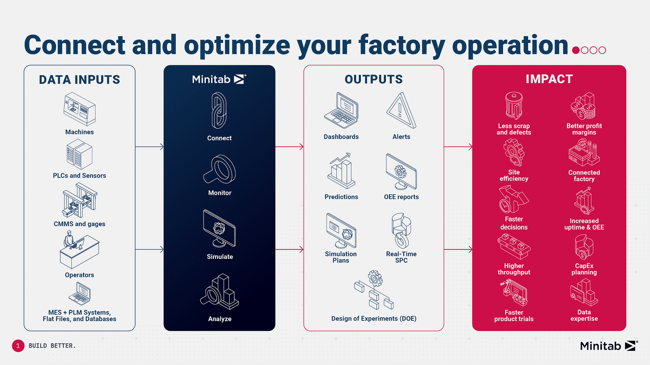
With direct MES connectivity, Real-Time SPC helps streamline the flow of production and process data into real-time quality monitoring. Instead of treating SPC as a separate system waiting for someone to feed it information, manufacturers can connect Real-Time SPC more directly to the systems already supporting the floor, giving operators, engineers, and managers a more current view of process performance.
### See how connected factory data drives better operations.
[](https://blog.minitab.com/hs/cta/wi/redirect?encryptedPayload=AVxigLIYuE%2FfnF3bqHRe%2FtgQNHfqrLKAf%2FG5MB%2F%2FAiJj0b6%2B5whN5YU0UfQvL0I8MhdX2RQWve8odEjeCmcrTRw1N2QxLYSFfYLOyrdpidsMXDvA5bPzawnKI%2BKWtcBVPRVDH2ImxNYBUnPc7iGYof2E4nh22YZ2ayCX%2FF3Q9vw0dgR0Ef3Vf%2FblZUxg4hZLt4ouQMtA2XgwyE8%3D&webInteractiveContentId=218722172843&portalId=3447555&hsLang=en)
## Less setup work, more time to improve the process
The most valuable quality systems fit the way teams actually work. They do not add extra administrative steps every time the process changes, make engineers rebuild the same information in multiple places, or slow down the path from production data to process insight.
That is the value of Automated Component Setup. Automated charts help teams get to monitoring faster, automated sampling plans make setup easier to standardize, and MES connectivity helps keep production data flowing into real-time quality workflows. Together, those capabilities make Real-Time SPC easier to deploy, easier to maintain, and more useful for the teams responsible for keeping production stable and quality under control.
For manufacturers trying to improve quality without adding more work to already stretched engineering, operations, and quality teams, the autoconfigure capability helps reduce the manual setup burden that can slow Real-Time SPC down, so teams can spend less time rebuilding the system around the process and more time improving the process itself.
### Ready to make Real-Time SPC easier to deploy, maintain, and scale? [](https://blog.minitab.com/hs/cta/wi/redirect?encryptedPayload=AVxigLJtc2kYjxyirW4MLkS8agzFbvjL503knofKjZz%2FhTlIGZ8Jg10mSu2ikeZnSX9bzRA9GKtQPZgrOTiRjBadrmiGBS4xOTsqp%2BBYkFP9R7SRvECEPeFTAvM6fL031W5TJ2SAo%2FLVsdsJrtuWo7I5ATZDwrd8bzQke2iNoZ4SrEJX1RCDLnAkudgsPCICzX7bN0U%3D&webInteractiveContentId=218722172964&portalId=3447555&hsLang=en)
## You Might Also Like
[When Beverage Demand Heats Up, Can Quality Keep Pace?](https://blog.minitab.com/en/blog/when-beverage-demand-heats-up-can-quality-keep-pace?hsLang=en)
[Food And Beverage](https://blog.minitab.com/en/blog/tag/food-and-beverage) | 4 Minute Read
[Build Better with Real-Time Manufacturing Visibility](https://blog.minitab.com/en/blog/build-better-with-real-time-manufacturing-visibility?hsLang=en)
[Prolink](https://blog.minitab.com/en/blog/tag/prolink) | 5 Minute Read
[How the Pyramids Might Have Been Built with Minitab](https://blog.minitab.com/en/blog/minitab-building-the-pyramids?hsLang=en)
[Simul8](https://blog.minitab.com/en/blog/tag/simul8) | 8 Minute Read
---
- [Careers](https://www.minitab.com/en-us/company/careers/)
- [Trust Center](https://www.minitab.com/en-us/trust-center/)
- [Suppliers](https://www.minitab.com/en-us/suppliers/)
- [Site Map](https://www.minitab.com/en-us/site-map/)
- [](https://www.linkedin.com/company/minitab/)
- [](https://www.facebook.com/Minitab/)
- [](https://www.youtube.com/user/MinitabInc)
- [](https://www.instagram.com/minitab/)
---
© 2025 Minitab, LLC. All Rights Reserved.
- [Terms of Use](https://www.minitab.com/en-us/legal/terms-of-use/)
- [Privacy Policy](https://www.minitab.com/en-us/legal/privacy-policy/)
- [Legal](https://www.minitab.com/en-us/legal/)
- Cookies Settings