---
title: "Process Simulation Analysis Module: Analyze Data and Optimize Results"
description: Explore Minitab’s Process Simulation Analysis Module to build more accurate models, compare scenarios, analyze variation, and optimize process performance.
image: https://blog.minitab.com/hubfs/chooser.png
---
English
- [English](https://blog.minitab.com/en/?hsLang=en)
- [Français](https://blog.minitab.com/fr/?hsLang=en)
- [Deutsch](https://blog.minitab.com/de/?hsLang=en)
- [Português](https://blog.minitab.com/pt/?hsLang=en)
- [Español](https://blog.minitab.com/es/?hsLang=en)
- [日本語](https://blog.minitab.com/ja/?hsLang=en)
- [한국어](https://blog.minitab.com/ko/?hsLang=en)
- [中文(简体)](https://blog.minitab.com/zh/?hsLang=en)
- [English](https://blog.minitab.com/en/blog/process-simulation-analysis-module)
- [Chinese](https://blog.minitab.com/zh/blog/process-simulation-analysis-module)
- [한국어](https://blog.minitab.com/ko/blog/process-simulation-analysis-module)
- [日本語](https://blog.minitab.com/ja/blog/process-simulation-analysis-module)
- [ Partners](https://www.minitab.com/en-us/company/partners/)
- [ Contact](https://www.minitab.com/en-us/company/contact-us/)
- [ Talk to Minitab](https://www.minitab.com/en-us/talk-to-minitab/)
- [ My Account](https://licensing.minitab.com/account/manage)
[](https://www.minitab.com/en-us/)
- Products
Back
[Products](https://www.minitab.com/en-us/products/)
[All Products](https://www.minitab.com/en-us/products/)
- [Minitab Solution Center](https://www.minitab.com/en-us/products/minitab-solution-center/)
- [Minitab Statistical Software](https://www.minitab.com/en-us/products/minitab/)
- [Minitab Connect](https://www.minitab.com/en-us/products/connect/)
- [Minitab Model Ops](https://www.minitab.com/en-us/products/model-ops/)
- [Minitab Education Hub](https://www.minitab.com/en-us/products/education-hub/)
- [Minitab Engage](https://www.minitab.com/en-us/products/engage/)
- [Minitab Workspace](https://www.minitab.com/en-us/products/workspace/)
- [Real-Time SPC](https://www.minitab.com/en-us/products/real-time-spc/)
- [Prolink Data Collection & SPC](https://www.minitab.com/en-us/products/prolink)
- [Simul8 Discrete Event Simulation](https://info.minitab.com/en/new-to-simul8?hsLang=en)
- [SPM](https://www.minitab.com/en-us/products/spm/)
- Solutions
Back
[Solutions](https://www.minitab.com/en-us/solutions/)
[All Solutions](https://www.minitab.com/en-us/solutions/)
- [Analytics](https://www.minitab.com/en-us/solutions/analytics/)
- [Statistics & Predictive Analytics](https://www.minitab.com/en-us/solutions/analytics/statistical-analysis-predictive-analytics/)
- [Data Science & Machine Learning](https://www.minitab.com/en-us/solutions/analytics/data-science-machine-learning/)
- [Business Analytics & Intelligence](https://www.minitab.com/en-us/solutions/analytics/business-analytics-intelligence/)
- [Statistical Process Control](https://www.minitab.com/en-us/solutions/analytics/statistical-process-control/)
- [Quality Analytics](https://www.minitab.com/en-us/solutions/analytics/quality-analytics/)
- [Live Analytics](https://www.minitab.com/en-us/solutions/analytics/live-analytics/)
- [Reliability & Life Data Analysis](https://www.minitab.com/en-us/solutions/analytics/reliability/)
- [Discrete Event Simulation](https://info.minitab.com/en/new-to-simul8?hsLang=en)
- [Process Mining](https://info.minitab.com/en/new-to-simul8?hsLang=en)
- [Key Capabilities](https://www.minitab.com/en-us/solutions/key-capabilities/)
- [Continuous Improvement](https://www.minitab.com/en-us/solutions/key-capabilities/continuous-improvement/)
- [Data Integration & Data Prep](https://www.minitab.com/en-us/solutions/key-capabilities/data-integration-data-prep/)
- [Diagramming & Mind Mapping](https://www.minitab.com/en-us/solutions/key-capabilities/diagramming-mind-mapping/)
- [Digital Twins](https://info.minitab.com/en/new-to-simul8?hsLang=en)
- [Model Deployment & ML Ops](https://www.minitab.com/en-us/solutions/key-capabilities/model-deployment-ml-ops/)
- [Innovation & Project Management](https://www.minitab.com/en-us/solutions/key-capabilities/innovation-project-management/)
- [Process Excellence: Detect, Correct & Prevent](https://www.minitab.com/en-us/solutions/key-capabilities/process-excellence/)
- [Featured Industries](https://www.minitab.com/en-us/solutions/industry/)
- [Academic](https://www.minitab.com/en-us/solutions/industry/academic/)
- [Energy & Natural Resources](https://www.minitab.com/en-us/solutions/industry/energy-resources/)
- [Government & Public Sector](https://www.minitab.com/en-us/solutions/industry/government/)
- [Healthcare](https://www.minitab.com/en-us/solutions/industry/healthcare/)
- [Insurance](https://www.minitab.com/en-us/solutions/industry/insurance/)
- [Manufacturing & Industrial](https://www.minitab.com/en-us/solutions/industry/manufacturing-industrial/)
- [Services](https://www.minitab.com/en-us/solutions/industry/service-industries/)
- [Software & Technology](https://www.minitab.com/en-us/solutions/industry/software-technology/)
- [Construction](https://www.minitab.com/en-us/solutions/industry/construction/)
- [Featured Roles](https://www.minitab.com/en-us/solutions/role/)
- [Engineering](https://www.minitab.com/en-us/solutions/role/engineering/)
- [Business Analysis](https://www.minitab.com/en-us/solutions/role/business-analysts/)
- [Information Technology](https://www.minitab.com/en-us/solutions/role/information-technology/)
- [Supply Chain](https://www.minitab.com/en-us/solutions/role/supply-chain/)
- [Customer Service & Contact Center](https://www.minitab.com/en-us/solutions/role/customer-service-contact-center/)
- [Human Resources](https://www.minitab.com/en-us/solutions/role/human-resources/)
- [Marketing](https://www.minitab.com/en-us/solutions/role/marketing/)
- [Research and Development](https://www.minitab.com/en-us/solutions/role/research-and-development/)
- Resources & Services
Back
[Resources & Services](https://www.minitab.com/en-us/resources-services/)
[All Resources & Services](https://www.minitab.com/en-us/resources-services/)
- [Resources](https://www.minitab.com/en-us/resources-services/resources/)
- [Case Studies](https://www.minitab.com/en-us/resources-services/resources/case-studies/)
- [eBooks & White Papers](https://www.minitab.com/en-us/resources-services/resources/ebooks-and-white-papers/)
- [Blog](https://blog.minitab.com/blog/?hsLang=en)
- [Data Sets](https://www.minitab.com/en-us/resources-services/resources/data-set/)
- [Webinars & Events](https://www.minitab.com/en-us/resources-services/resources/events/)
- [Education Hub](https://www.minitab.com/en-us/resources-services/resources/education-hub/)
- [Services](https://www.minitab.com/en-us/resources-services/services/)
- [Training](https://www.minitab.com/en-us/resources-services/services/training/)
- [Deployment](https://www.minitab.com/en-us/resources-services/services/deployment/)
- [Consulting](https://www.minitab.com/en-us/resources-services/services/statistical-consulting/)
- [Self-Paced Learning](https://www.minitab.com/en-us/resources-services/services/self-paced-learning/)
- [Continuing Education](https://www.minitab.com/en-us/resources-services/services/continuing-education/)
- Support
Back
[Support](https://www.minitab.com/en-us/support/)
[Technical Support](https://www.minitab.com/en-us/support/)
- [Subscriptions & Activation](https://www.minitab.com/en-us/support/subscriptions-and-activation/)
- [Minitab Quick Start](https://www.minitab.com/en-us/support/quick-start/)
- [Training](https://www.minitab.com/en-us/resources-services/services/training/)
- [Installation Support](https://www.minitab.com/en-us/support/installation/)
- [Support Videos](https://www.minitab.com/en-us/support/videos/)
- [Support Documentation](https://www.minitab.com/en-us/support/documents/)
- [Software Updates](https://www.minitab.com/en-us/support/software-updates/)
- [Product Downloads](https://www.minitab.com/en-us/support/downloads/)
- [Support Policy](https://www.minitab.com/en-us/support/policy/)
- Company
Back
[Company](https://www.minitab.com/en-us/company/)
[Company](https://www.minitab.com/en-us/company/)
- [About Us](https://www.minitab.com/en-us/company/our-company/)
- [Leadership Team](https://www.minitab.com/en-us/company/leadership-team/)
- [Partners](https://www.minitab.com/en-us/company/partners/)
- [Careers](https://www.minitab.com/en-us/company/careers/)
- [Contact](https://www.minitab.com/en-us/company/contact-us/)
- [News](https://www.minitab.com/en-us/company/press-releases/)
[Try/Buy](https://www.minitab.com/en-us/try-buy/)
- [Statistics](https://blog.minitab.com/en/blog/tag/statistics)
- [Data Analysis](https://blog.minitab.com/en/blog/tag/data-analysis)
-
- [Quality Improvement](https://blog.minitab.com/en/blog/tag/quality-improvement)
- [Subscribe](https://info.minitab.com/blog/subscribe?hsLang=en)

## Notice
You are now leaving minitab.com.
Click Continue to proceed to:
Continue
Go Back
# Process Simulation Analysis Module: Analyze Data and Optimize Results
[Alyssa Sarro](https://blog.minitab.com/en/blog/author/alyssa-sarro) | 7/30/2026
Topics: [Simul8](https://blog.minitab.com/en/blog/tag/simul8), [optimization](https://blog.minitab.com/en/blog/tag/optimization), [Minitab Solution Center](https://blog.minitab.com/en/blog/tag/minitab-solution-center)
- [Share](https://www.linkedin.com/shareArticle?mini=true&url=https://blog.minitab.com/en/blog/process-simulation-analysis-module)
- [Share](https://www.facebook.com/sharer.php?u=https://blog.minitab.com/en/blog/process-simulation-analysis-module)
Simulation gives organizations the ability to test ideas before putting them into practice. From evaluating production schedules to facility layouts, process simulation helps reduce risk by modeling different scenarios before changes are implemented.
Many organizations recognize the value of simulation, yet hesitate to adopt it more broadly because it appears to require specialized analytical knowledge.
Simulation runs can generate hundreds or thousands of observations across multiple scenarios. Determining which scenario performs best, understanding how variation affects performance, and validating the assumptions behind a model all require more than just reviewing a summary report.
[Minitab’s Process Simulation Analysis Module](https://www.minitab.com/en-us/products/minitab/process-simulation-analysis-module/), a new add-on module for Minitab Statistical Software, is designed specifically for teams that use simulation to evaluate operational improvements. It combines statistical analysis, data visualization, and guided workflows that help users prepare inputs, analyze results, compare scenarios, and make smarter decisions.
## Understand the Story Behind Your Simulation Output
When engineers and analysts need answers to important operational questions, a digital twin can help them test scenarios through simulation. Each simulation produces data that reveals what happened, why it happened, and how the system performed. But the value of those results depends on how well the data is interpreted. That is where data analytics becomes essential, turning simulation output into clear, actionable insights.
- *Are my simulation inputs based on realistic process behavior?*
- *Which scenario delivers the most consistent performance?*
- *How much variation exists across simulation runs?*
- *Which process variables have the greatest impact on outcomes?*
Answering these questions requires statistical analysis, a core strength of Minitab Statistical Software (MSS).
### The Process Simulation Analysis Module brings together the tools needed to investigate simulation data within a guided workflow built directly into Minitab Statistical Software. [](https://blog.minitab.com/hs/cta/wi/redirect?encryptedPayload=AVxigLJePLNxlX74x%2B0tADVpZmBGJi4At%2BDWeZT02SCpm2gZqFNdbbstaLRFsIi8w2H8NEEO0Zw4O6ODLfT7uULyLM4L7ZFxslRZt7YbBzbrrShNGJI39nUAVvzlxBxaFY1Fq2ARn0FCYXKMU%2FXDJVmqWaEQSxf1kqa7XLY9MeK210w9ZdoOCw6nOFZLelUmjFCudEmqAGScNk0%2B0Luquo9OAPOL530Dik0z8%2FhFrXZhEJzNUlIBjNT3J37ynOLHvQ6qYz%2FwKLJZ6cBE&webInteractiveContentId=218294848046&portalId=3447555&hsLang=en)
## A Complete Workflow for Process Simulation Analysis
Build More Accurate Simulation Models
Create stronger simulation inputs by using historical process data to understand how your process behaves in the real world. Identify appropriate probability distributions, analyze trends over time, build predictive models for process timing, and develop decision logic that reflects actual operating conditions. 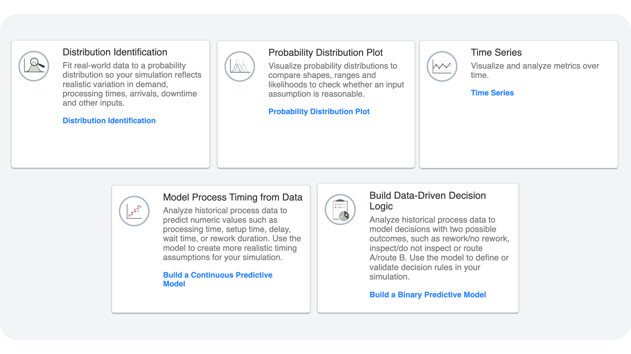
Explore and Compare Simulation Results
Move beyond summary statistics to understand what your simulation is telling you. Visualize outputs with interactive charts, compare multiple scenarios, evaluate variation, and identify the process changes that deliver the best and most consistent performance. 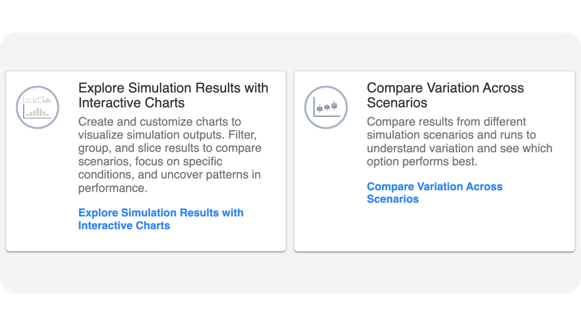
Optimize Process Performance with Statistical Analysis
Use statistical methods to identify the variables that have the greatest impact on process outcomes. Design experiments more efficiently, evaluate multiple factors at once, and make process improvement decisions backed by data instead of trial and error.
Simulation helps organizations reduce risk before making operational changes. The Process Simulation Analysis Module strengthens that process by helping users understand the data behind their models and the results those models produce. 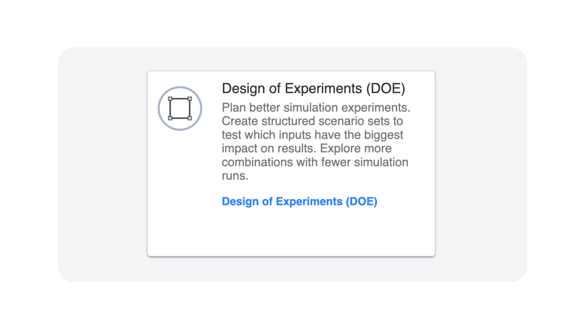
By combining simulation-focused workflows with Minitab's statistical capabilities, teams can:
- Build simulation models using more representative process data.
- Explore simulation results through interactive visualizations.
- Compare scenarios with a deeper understanding of variation.
- Investigate the factors that influence performance.
- Support operational decisions with stronger analytical evidence.
### See How the Process Simulation Analysis Module Fits Your Workflow
Every simulation workflow is different. We'll help you understand how the Process Simulation Analysis Module can support your process improvement initiatives and analytical needs.
[](https://blog.minitab.com/hs/cta/wi/redirect?encryptedPayload=AVxigLIdObLOgVAnOJ3WiPaiVI2lbo9IV9nVp8Qi5o7GQ%2BhbcLdQcyX40EEeWWYy%2FYq4mLYc89%2F5huDIhl5MzY5wKzVJw5Yx98tIICKeOoORRsJuyC0nq3SnC9Ma0CKSHRXKx817KaNrcLu%2BIpc%2BIovnu8yOIhd03v8vpsfjKHko9x9HjWTOFkCPmNc9zEbYT9iH8KTfLKKPurYuKHUx3ofaj9wo%2FDdM&webInteractiveContentId=218294848058&portalId=3447555&hsLang=en)
## You Might Also Like
[Scale Simulation Across Your Organization](https://blog.minitab.com/en/blog/scale-simulation-across-your-organization?hsLang=en)
[Minitab Solution Center](https://blog.minitab.com/en/blog/tag/minitab-solution-center) | 4 Minute Read
[Understanding t-Tests: Why Degrees of Freedom Appeared in Minitab (and Why They Matter)](https://blog.minitab.com/en/blog/understanding-t-tests-why-degrees-of-freedom-appeared-in-minitab-and-why-they-matter?hsLang=en)
[Minitab Solution Center](https://blog.minitab.com/en/blog/tag/minitab-solution-center) | 5 Minute Read
[Which World Cup Quarterfinal Teams Look Most Like Past Champions?](https://blog.minitab.com/en/blog/which-world-cup-quarterfinal-teams-look-most-like-past-champions?hsLang=en)
[Minitab Solution Center](https://blog.minitab.com/en/blog/tag/minitab-solution-center) | 6 Minute Read
---
- [Careers](https://www.minitab.com/en-us/company/careers/)
- [Trust Center](https://www.minitab.com/en-us/trust-center/)
- [Suppliers](https://www.minitab.com/en-us/suppliers/)
- [Site Map](https://www.minitab.com/en-us/site-map/)
- [](https://www.linkedin.com/company/minitab/)
- [](https://www.facebook.com/Minitab/)
- [](https://www.youtube.com/user/MinitabInc)
- [](https://www.instagram.com/minitab/)
---
© 2025 Minitab, LLC. All Rights Reserved.
- [Terms of Use](https://www.minitab.com/en-us/legal/terms-of-use/)
- [Privacy Policy](https://www.minitab.com/en-us/legal/privacy-policy/)
- [Legal](https://www.minitab.com/en-us/legal/)
- Cookies Settings