---
title: Quickly Run a Python Script with a Button in Minitab
description: Learn about Minitab’s new Python integration feature and how to easily run custom Python code via a button in the Minitab interface.
image: https://blog.minitab.com/hubfs/B2BML%20-%20NEW%20FILE%20MANAGER%20STRUCTURE/Blog%20Images/Imported_Blog_Media/python-script-screenshot-Jul-06-2025-12-45-13-1814-AM.png
---
English
- [English](https://blog.minitab.com/en/?hsLang=en)
- [Français](https://blog.minitab.com/fr/?hsLang=en)
- [Deutsch](https://blog.minitab.com/de/?hsLang=en)
- [Português](https://blog.minitab.com/pt/?hsLang=en)
- [Español](https://blog.minitab.com/es/?hsLang=en)
- [日本語](https://blog.minitab.com/ja/?hsLang=en)
- [한국어](https://blog.minitab.com/ko/?hsLang=en)
- [中文(简体)](https://blog.minitab.com/zh/?hsLang=en)
- [English](https://blog.minitab.com/en/blog/quickly-run-python-script-button-minitab)
- [한국어](https://blog.minitab.com/ko/blog/quickly-run-python-script-button-minitab)
- [日本語](https://blog.minitab.com/ja/blog/quickly-run-python-script-button-minitab)
- [ Partners](https://www.minitab.com/en-us/company/partners/)
- [ Contact](https://www.minitab.com/en-us/company/contact-us/)
- [ Talk to Minitab](https://www.minitab.com/en-us/talk-to-minitab/)
- [ My Account](https://licensing.minitab.com/account/manage)
[](https://www.minitab.com/en-us/)
- Products
Back
[Products](https://www.minitab.com/en-us/products/)
[All Products](https://www.minitab.com/en-us/products/)
- [Minitab Solution Center](https://www.minitab.com/en-us/products/minitab-solution-center/)
- [Minitab Statistical Software](https://www.minitab.com/en-us/products/minitab/)
- [Minitab Connect](https://www.minitab.com/en-us/products/connect/)
- [Minitab Model Ops](https://www.minitab.com/en-us/products/model-ops/)
- [Minitab Education Hub](https://www.minitab.com/en-us/products/education-hub/)
- [Minitab Engage](https://www.minitab.com/en-us/products/engage/)
- [Minitab Workspace](https://www.minitab.com/en-us/products/workspace/)
- [Real-Time SPC](https://www.minitab.com/en-us/products/real-time-spc/)
- [Prolink Data Collection & SPC](https://www.minitab.com/en-us/products/prolink)
- [Simul8 Discrete Event Simulation](https://info.minitab.com/en/new-to-simul8?hsLang=en)
- [SPM](https://www.minitab.com/en-us/products/spm/)
- Solutions
Back
[Solutions](https://www.minitab.com/en-us/solutions/)
[All Solutions](https://www.minitab.com/en-us/solutions/)
- [Analytics](https://www.minitab.com/en-us/solutions/analytics/)
- [Statistics & Predictive Analytics](https://www.minitab.com/en-us/solutions/analytics/statistical-analysis-predictive-analytics/)
- [Data Science & Machine Learning](https://www.minitab.com/en-us/solutions/analytics/data-science-machine-learning/)
- [Business Analytics & Intelligence](https://www.minitab.com/en-us/solutions/analytics/business-analytics-intelligence/)
- [Statistical Process Control](https://www.minitab.com/en-us/solutions/analytics/statistical-process-control/)
- [Quality Analytics](https://www.minitab.com/en-us/solutions/analytics/quality-analytics/)
- [Live Analytics](https://www.minitab.com/en-us/solutions/analytics/live-analytics/)
- [Reliability & Life Data Analysis](https://www.minitab.com/en-us/solutions/analytics/reliability/)
- [Discrete Event Simulation](https://info.minitab.com/en/new-to-simul8?hsLang=en)
- [Process Mining](https://info.minitab.com/en/new-to-simul8?hsLang=en)
- [Key Capabilities](https://www.minitab.com/en-us/solutions/key-capabilities/)
- [Continuous Improvement](https://www.minitab.com/en-us/solutions/key-capabilities/continuous-improvement/)
- [Data Integration & Data Prep](https://www.minitab.com/en-us/solutions/key-capabilities/data-integration-data-prep/)
- [Diagramming & Mind Mapping](https://www.minitab.com/en-us/solutions/key-capabilities/diagramming-mind-mapping/)
- [Digital Twins](https://info.minitab.com/en/new-to-simul8?hsLang=en)
- [Model Deployment & ML Ops](https://www.minitab.com/en-us/solutions/key-capabilities/model-deployment-ml-ops/)
- [Innovation & Project Management](https://www.minitab.com/en-us/solutions/key-capabilities/innovation-project-management/)
- [Process Excellence: Detect, Correct & Prevent](https://www.minitab.com/en-us/solutions/key-capabilities/process-excellence/)
- [Featured Industries](https://www.minitab.com/en-us/solutions/industry/)
- [Academic](https://www.minitab.com/en-us/solutions/industry/academic/)
- [Energy & Natural Resources](https://www.minitab.com/en-us/solutions/industry/energy-resources/)
- [Government & Public Sector](https://www.minitab.com/en-us/solutions/industry/government/)
- [Healthcare](https://www.minitab.com/en-us/solutions/industry/healthcare/)
- [Insurance](https://www.minitab.com/en-us/solutions/industry/insurance/)
- [Manufacturing & Industrial](https://www.minitab.com/en-us/solutions/industry/manufacturing-industrial/)
- [Services](https://www.minitab.com/en-us/solutions/industry/service-industries/)
- [Software & Technology](https://www.minitab.com/en-us/solutions/industry/software-technology/)
- [Construction](https://www.minitab.com/en-us/solutions/industry/construction/)
- [Featured Roles](https://www.minitab.com/en-us/solutions/role/)
- [Engineering](https://www.minitab.com/en-us/solutions/role/engineering/)
- [Business Analysis](https://www.minitab.com/en-us/solutions/role/business-analysts/)
- [Information Technology](https://www.minitab.com/en-us/solutions/role/information-technology/)
- [Supply Chain](https://www.minitab.com/en-us/solutions/role/supply-chain/)
- [Customer Service & Contact Center](https://www.minitab.com/en-us/solutions/role/customer-service-contact-center/)
- [Human Resources](https://www.minitab.com/en-us/solutions/role/human-resources/)
- [Marketing](https://www.minitab.com/en-us/solutions/role/marketing/)
- [Research and Development](https://www.minitab.com/en-us/solutions/role/research-and-development/)
- Resources & Services
Back
[Resources & Services](https://www.minitab.com/en-us/resources-services/)
[All Resources & Services](https://www.minitab.com/en-us/resources-services/)
- [Resources](https://www.minitab.com/en-us/resources-services/resources/)
- [Case Studies](https://www.minitab.com/en-us/resources-services/resources/case-studies/)
- [eBooks & White Papers](https://www.minitab.com/en-us/resources-services/resources/ebooks-and-white-papers/)
- [Blog](https://blog.minitab.com/blog/?hsLang=en)
- [Data Sets](https://www.minitab.com/en-us/resources-services/resources/data-set/)
- [Webinars & Events](https://www.minitab.com/en-us/resources-services/resources/events/)
- [Education Hub](https://www.minitab.com/en-us/resources-services/resources/education-hub/)
- [Services](https://www.minitab.com/en-us/resources-services/services/)
- [Training](https://www.minitab.com/en-us/resources-services/services/training/)
- [Deployment](https://www.minitab.com/en-us/resources-services/services/deployment/)
- [Consulting](https://www.minitab.com/en-us/resources-services/services/statistical-consulting/)
- [Self-Paced Learning](https://www.minitab.com/en-us/resources-services/services/self-paced-learning/)
- [Continuing Education](https://www.minitab.com/en-us/resources-services/services/continuing-education/)
- Support
Back
[Support](https://www.minitab.com/en-us/support/)
[Technical Support](https://www.minitab.com/en-us/support/)
- [Subscriptions & Activation](https://www.minitab.com/en-us/support/subscriptions-and-activation/)
- [Minitab Quick Start](https://www.minitab.com/en-us/support/quick-start/)
- [Training](https://www.minitab.com/en-us/resources-services/services/training/)
- [Installation Support](https://www.minitab.com/en-us/support/installation/)
- [Support Videos](https://www.minitab.com/en-us/support/videos/)
- [Support Documentation](https://www.minitab.com/en-us/support/documents/)
- [Software Updates](https://www.minitab.com/en-us/support/software-updates/)
- [Product Downloads](https://www.minitab.com/en-us/support/downloads/)
- [Support Policy](https://www.minitab.com/en-us/support/policy/)
- Company
Back
[Company](https://www.minitab.com/en-us/company/)
[Company](https://www.minitab.com/en-us/company/)
- [About Us](https://www.minitab.com/en-us/company/our-company/)
- [Leadership Team](https://www.minitab.com/en-us/company/leadership-team/)
- [Partners](https://www.minitab.com/en-us/company/partners/)
- [Careers](https://www.minitab.com/en-us/company/careers/)
- [Contact](https://www.minitab.com/en-us/company/contact-us/)
- [News](https://www.minitab.com/en-us/company/press-releases/)
[Try/Buy](https://www.minitab.com/en-us/try-buy/)
- [Statistics](https://blog.minitab.com/en/blog/tag/statistics)
- [Data Analysis](https://blog.minitab.com/en/blog/tag/data-analysis)
-
- [Quality Improvement](https://blog.minitab.com/en/blog/tag/quality-improvement)
- [Subscribe](https://info.minitab.com/blog/subscribe?hsLang=en)

## Notice
You are now leaving minitab.com.
Click Continue to proceed to:
Continue
Go Back
# Quickly Run a Python Script with a Button in Minitab
Minitab Blog Editor | 7/1/2020
Topics: [Machine Learning](https://blog.minitab.com/en/blog/tag/machine-learning), [Minitab Statistical Software](https://blog.minitab.com/en/blog/tag/minitab-statistical-software), [Python](https://blog.minitab.com/en/blog/tag/python)
- [Share](https://www.linkedin.com/shareArticle?mini=true&url=https://blog.minitab.com/en/blog/quickly-run-python-script-button-minitab)
- [Share](https://www.facebook.com/sharer.php?u=https://blog.minitab.com/en/blog/quickly-run-python-script-button-minitab)
If you’ve ever wished for an easy way to add a custom analysis to Minitab’s interface, read on! Minitab’s new Python integration feature allows an avenue for easily running custom Python code via a button in the Minitab interface. If you’re not a programmer, fear not! I’m no programmer myself, so if I can do this, you can too.
In this post, I’ll walk through the steps to add a custom menu with a button to execute a Python script that will generate a QQ plot and display the results in Minitab’s output pane.
If you’re a coding wizard, this example is very simple but will give you a feel for how easily you could set up something similar for others in your organization, allowing them take advantage of your custom code. **You’ll be a hero!**
## First Things First: Let's Get Python Up and Running
This feature is available starting with Minitab 19.2020.1, and you’ll need [Python 3.6.1 or higher installed on your machine](https://www.anaconda.com/products/individual). You can find all the details about connecting Minitab to Python [here](https://support.minitab.com/minitab/19/python-integration/introduction/?utm_campaign=Webinar%20Wednesdays&utm_source=blog&utm_medium=python-integration-qq-plot).
The Python script to generate the QQ plot, along with the necessary commands to send your data from Minitab to Python and return the results to Minitab are shown below:
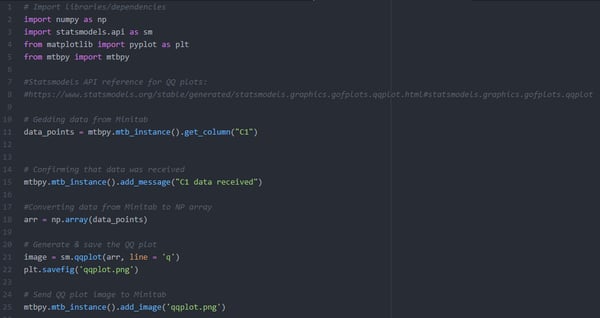
You can also download the Python script above from [here](https://blog.minitab.com/hubfs/Blog/QQ_plot.py?hsLang=en). I found the script to generate the QQ plot by searching the internet, which is easy to do for anyone that doesn’t want to learn to code. **Note** that the above code will retrieve the data for the QQ plot for column C1 in your Minitab worksheet.
### **Are You a Coding Whiz?**
[](https://cta-redirect.hubspot.com/cta/redirect/3447555/731aa4f7-2d84-4d5c-af44-831db7f47cea)
## Set the Python File Location in Minitab
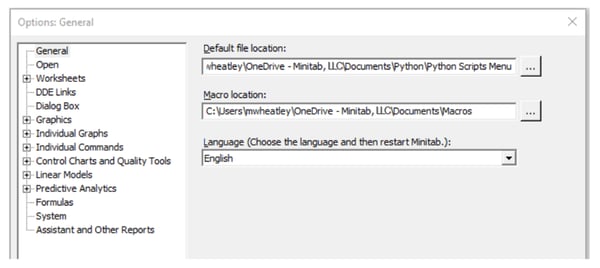
We’ll start by telling Minitab where to find your Python script, using this menu path: **File \> Options**. In the new window, browse to the **Default file location** where you saved the script. Minitab will look for your Python script in the folder you specify.
## 
## Make a New Custom Minitab Menu
1. Choose **View** \> **Customize.**
2. On the **Commands** tab, from the **Categories** list, select **New Menu**, then from the **Commands** list, select **New Menu.**
3. While the **Customize** dialog box is open, drag **New Menu** to where you want it to appear in the Minitab interface. When the insertion point appears, release the mouse button.

4. From the new menu's location in the Minitab interface, right-click **New Menu** and choose **Name Button**. Enter a name for your custom menu, for example, *Python Scripts*, and click **OK.**
****
5. Click **Close**.
Are you still with me? Nice work! You’re almost there!
## Create a Minitab Exec Macro to Call Your Python Script
Now, open a new Windows notepad file and type in the following commands:
**PYSC "QQ\_plot.py"**
This **PYSC** command tells Minitab to call Python, and to run the QQ plot script. **PYSC** is the Minitab command, and the value between the double-quotes is the name of the script you want to execute.
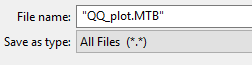
To save the commands in the Minitab exec, save the text file and title it **QQ\_Plot.MTB** (be sure to save it with .MTB and not .txt). Save the file to the **Default file location** where the Python script is saved (the same location you set in Minitab using **File \> Options**):
Excellent job! Next, we’ll create a command to run a Minitab exec file.
## Create a Command to Run a Minitab Exec File
1. Choose **View** \> **Customize**.
2. In the **Customize** dialog box, click the **Tools** tab.
3. On the **Tools** tab, click the **New (Insert)** button  .
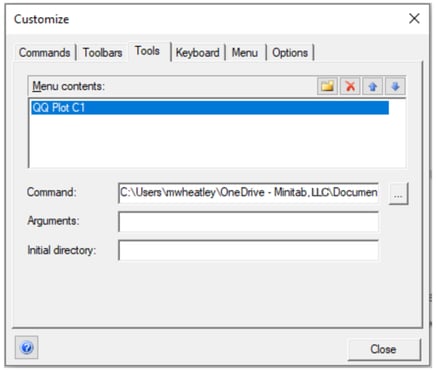
4. Type a name for the command (I titled my command **QQ plot C1** so that I’ll remember that the data for this command should be in C1 in the worksheet), then press the **Enter** key.
5. Click the **Open** button (**...**).
6. From the file type drop-down list, select **All (\*.\*)**.
7. Browse to and select the exec file titled **QQ\_plot.MTB** that you saved previously:
## Finally, Add your Macro to Your Custom Menu and Make Your Minitab/Python QQ Plot!
1. Choose **View** \> **Customize**.
2. In the **Customize** dialog box, click the **Commands** tab.
3. From the **Categories** list, select a category.
4. From the **Commands** list, select the command to add.
5. While the **Customize** dialog box is open, drag the selected command to your custom menu in the Minitab interface.
6. Click **Close**.
Fantastic! Are you still with me, and are you ready to see the results?
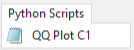
After adding some data to the Minitab worksheet (in column C1 if you’re using the script shared in this post), click the **QQ Plot C1** button you created in your custom menu on the right, **Python Scripts**:
Minitab will send your data to Python, then Python will execute the code and send the graph back to the Minitab output pane:
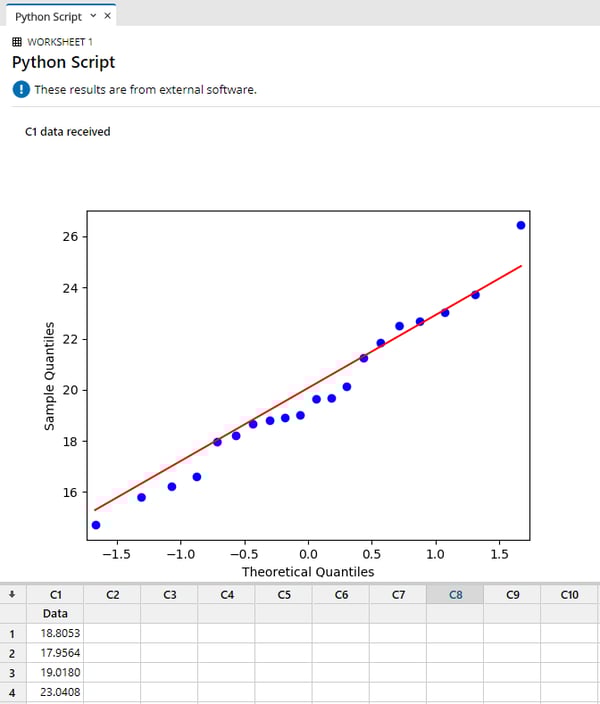
Way to go! Minitab’s new Python integration feature and free open-source code make it easy for people like us, that may want access to some extra features but aren’t particularly interested in learning to code.
And if you haven’t yet tried Minitab 19.2020.1, [get your free 30-day trial today](http://www.minitab.com/products/minitab/free-trial/?utm_campaign=Webinar%20Wednesdays&utm_source=blog&utm_medium=python-integration-qq-plot)!
[](https://cta-redirect.hubspot.com/cta/redirect/3447555/d821cffc-2fc1-4631-9b79-71b433251c6d)
## You Might Also Like
[What Is AutoML? Model Building, Deployment, and Oversight](https://blog.minitab.com/en/blog/what-is-automl-model-building-deployment-and-oversight?hsLang=en)
[Minitab Ai](https://blog.minitab.com/en/blog/tag/minitab-ai) | 6 Minute Read
[Confidence in Every Calculation: How Minitab Supports FDA-Regulated Validation](https://blog.minitab.com/en/blog/confidence-in-every-calculation-how-minitab-supports-fda-regulated-validation?hsLang=en)
[Minitab Solution Center](https://blog.minitab.com/en/blog/tag/minitab-solution-center) | 4 Minute Read
[Seedling Series #3: Simplifying Your Data Story with Minitab](https://blog.minitab.com/en/blog/seedling-series-3-simplifying-your-data-story-with-minitab?hsLang=en)
[Minitab Statistical Software](https://blog.minitab.com/en/blog/tag/minitab-statistical-software) | 3 Minute Read
---
- [Careers](https://www.minitab.com/en-us/company/careers/)
- [Trust Center](https://www.minitab.com/en-us/trust-center/)
- [Suppliers](https://www.minitab.com/en-us/suppliers/)
- [Site Map](https://www.minitab.com/en-us/site-map/)
- [](https://www.linkedin.com/company/minitab/)
- [](https://www.facebook.com/Minitab/)
- [](https://www.youtube.com/user/MinitabInc)
- [](https://www.instagram.com/minitab/)
---
© 2025 Minitab, LLC. All Rights Reserved.
- [Terms of Use](https://www.minitab.com/en-us/legal/terms-of-use/)
- [Privacy Policy](https://www.minitab.com/en-us/legal/privacy-policy/)
- [Legal](https://www.minitab.com/en-us/legal/)
- Cookies Settings