---
title: The Ultimate Guide to Gantt Charts
description: Looking for a way to visualize tasks and keep teams on track during a project? Use a Gantt Chart. Learn more about this powerful tool in Minitab Workspace.
image: https://blog.minitab.com/hubfs/B2BML%20-%20NEW%20FILE%20MANAGER%20STRUCTURE/Blog%20Images/Imported_Blog_Media/gantt-chart-workspace-blog-header-image-2-Jul-05-2025-11-07-05-0354-PM.jpg
---
English
- [English](https://blog.minitab.com/en/?hsLang=en)
- [Français](https://blog.minitab.com/fr/?hsLang=en)
- [Deutsch](https://blog.minitab.com/de/?hsLang=en)
- [Português](https://blog.minitab.com/pt/?hsLang=en)
- [Español](https://blog.minitab.com/es/?hsLang=en)
- [日本語](https://blog.minitab.com/ja/?hsLang=en)
- [한국어](https://blog.minitab.com/ko/?hsLang=en)
- [中文(简体)](https://blog.minitab.com/zh/?hsLang=en)
- [English](https://blog.minitab.com/en/blog/ultimate-guide-to-gantt-charts)
- [Chinese](https://blog.minitab.com/zh/blog/ultimate-guide-to-gantt-charts)
- [Deutsch](https://blog.minitab.com/de/blog/der-ultimative-leitfaden-zu-gantt-diagrammen)
- [한국어](https://blog.minitab.com/ko/blog/ultimate-guide-to-gantt-charts)
- [日本語](https://blog.minitab.com/ja/blog/ultimate-guide-to-gantt-charts)
- [ Partners](https://www.minitab.com/en-us/company/partners/)
- [ Contact](https://www.minitab.com/en-us/company/contact-us/)
- [ Talk to Minitab](https://www.minitab.com/en-us/talk-to-minitab/)
- [ My Account](https://licensing.minitab.com/account/manage)
[](https://www.minitab.com/en-us/)
- Products
Back
[Products](https://www.minitab.com/en-us/products/)
[All Products](https://www.minitab.com/en-us/products/)
- [Minitab Solution Center](https://www.minitab.com/en-us/products/minitab-solution-center/)
- [Minitab Statistical Software](https://www.minitab.com/en-us/products/minitab/)
- [Minitab Connect](https://www.minitab.com/en-us/products/connect/)
- [Minitab Model Ops](https://www.minitab.com/en-us/products/model-ops/)
- [Minitab Education Hub](https://www.minitab.com/en-us/products/education-hub/)
- [Minitab Engage](https://www.minitab.com/en-us/products/engage/)
- [Minitab Workspace](https://www.minitab.com/en-us/products/workspace/)
- [Real-Time SPC](https://www.minitab.com/en-us/products/real-time-spc/)
- [Prolink Data Collection & SPC](https://www.minitab.com/en-us/products/prolink)
- [Simul8 Discrete Event Simulation](https://info.minitab.com/en/new-to-simul8?hsLang=en)
- [SPM](https://www.minitab.com/en-us/products/spm/)
- Solutions
Back
[Solutions](https://www.minitab.com/en-us/solutions/)
[All Solutions](https://www.minitab.com/en-us/solutions/)
- [Analytics](https://www.minitab.com/en-us/solutions/analytics/)
- [Statistics & Predictive Analytics](https://www.minitab.com/en-us/solutions/analytics/statistical-analysis-predictive-analytics/)
- [Data Science & Machine Learning](https://www.minitab.com/en-us/solutions/analytics/data-science-machine-learning/)
- [Business Analytics & Intelligence](https://www.minitab.com/en-us/solutions/analytics/business-analytics-intelligence/)
- [Statistical Process Control](https://www.minitab.com/en-us/solutions/analytics/statistical-process-control/)
- [Quality Analytics](https://www.minitab.com/en-us/solutions/analytics/quality-analytics/)
- [Live Analytics](https://www.minitab.com/en-us/solutions/analytics/live-analytics/)
- [Reliability & Life Data Analysis](https://www.minitab.com/en-us/solutions/analytics/reliability/)
- [Discrete Event Simulation](https://info.minitab.com/en/new-to-simul8?hsLang=en)
- [Process Mining](https://info.minitab.com/en/new-to-simul8?hsLang=en)
- [Key Capabilities](https://www.minitab.com/en-us/solutions/key-capabilities/)
- [Continuous Improvement](https://www.minitab.com/en-us/solutions/key-capabilities/continuous-improvement/)
- [Data Integration & Data Prep](https://www.minitab.com/en-us/solutions/key-capabilities/data-integration-data-prep/)
- [Diagramming & Mind Mapping](https://www.minitab.com/en-us/solutions/key-capabilities/diagramming-mind-mapping/)
- [Digital Twins](https://info.minitab.com/en/new-to-simul8?hsLang=en)
- [Model Deployment & ML Ops](https://www.minitab.com/en-us/solutions/key-capabilities/model-deployment-ml-ops/)
- [Innovation & Project Management](https://www.minitab.com/en-us/solutions/key-capabilities/innovation-project-management/)
- [Process Excellence: Detect, Correct & Prevent](https://www.minitab.com/en-us/solutions/key-capabilities/process-excellence/)
- [Featured Industries](https://www.minitab.com/en-us/solutions/industry/)
- [Academic](https://www.minitab.com/en-us/solutions/industry/academic/)
- [Energy & Natural Resources](https://www.minitab.com/en-us/solutions/industry/energy-resources/)
- [Government & Public Sector](https://www.minitab.com/en-us/solutions/industry/government/)
- [Healthcare](https://www.minitab.com/en-us/solutions/industry/healthcare/)
- [Insurance](https://www.minitab.com/en-us/solutions/industry/insurance/)
- [Manufacturing & Industrial](https://www.minitab.com/en-us/solutions/industry/manufacturing-industrial/)
- [Services](https://www.minitab.com/en-us/solutions/industry/service-industries/)
- [Software & Technology](https://www.minitab.com/en-us/solutions/industry/software-technology/)
- [Construction](https://www.minitab.com/en-us/solutions/industry/construction/)
- [Featured Roles](https://www.minitab.com/en-us/solutions/role/)
- [Engineering](https://www.minitab.com/en-us/solutions/role/engineering/)
- [Business Analysis](https://www.minitab.com/en-us/solutions/role/business-analysts/)
- [Information Technology](https://www.minitab.com/en-us/solutions/role/information-technology/)
- [Supply Chain](https://www.minitab.com/en-us/solutions/role/supply-chain/)
- [Customer Service & Contact Center](https://www.minitab.com/en-us/solutions/role/customer-service-contact-center/)
- [Human Resources](https://www.minitab.com/en-us/solutions/role/human-resources/)
- [Marketing](https://www.minitab.com/en-us/solutions/role/marketing/)
- [Research and Development](https://www.minitab.com/en-us/solutions/role/research-and-development/)
- Resources & Services
Back
[Resources & Services](https://www.minitab.com/en-us/resources-services/)
[All Resources & Services](https://www.minitab.com/en-us/resources-services/)
- [Resources](https://www.minitab.com/en-us/resources-services/resources/)
- [Case Studies](https://www.minitab.com/en-us/resources-services/resources/case-studies/)
- [eBooks & White Papers](https://www.minitab.com/en-us/resources-services/resources/ebooks-and-white-papers/)
- [Blog](https://blog.minitab.com/blog/?hsLang=en)
- [Data Sets](https://www.minitab.com/en-us/resources-services/resources/data-set/)
- [Webinars & Events](https://www.minitab.com/en-us/resources-services/resources/events/)
- [Education Hub](https://www.minitab.com/en-us/resources-services/resources/education-hub/)
- [Services](https://www.minitab.com/en-us/resources-services/services/)
- [Training](https://www.minitab.com/en-us/resources-services/services/training/)
- [Deployment](https://www.minitab.com/en-us/resources-services/services/deployment/)
- [Consulting](https://www.minitab.com/en-us/resources-services/services/statistical-consulting/)
- [Self-Paced Learning](https://www.minitab.com/en-us/resources-services/services/self-paced-learning/)
- [Continuing Education](https://www.minitab.com/en-us/resources-services/services/continuing-education/)
- Support
Back
[Support](https://www.minitab.com/en-us/support/)
[Technical Support](https://www.minitab.com/en-us/support/)
- [Subscriptions & Activation](https://www.minitab.com/en-us/support/subscriptions-and-activation/)
- [Minitab Quick Start](https://www.minitab.com/en-us/support/quick-start/)
- [Training](https://www.minitab.com/en-us/resources-services/services/training/)
- [Installation Support](https://www.minitab.com/en-us/support/installation/)
- [Support Videos](https://www.minitab.com/en-us/support/videos/)
- [Support Documentation](https://www.minitab.com/en-us/support/documents/)
- [Software Updates](https://www.minitab.com/en-us/support/software-updates/)
- [Product Downloads](https://www.minitab.com/en-us/support/downloads/)
- [Support Policy](https://www.minitab.com/en-us/support/policy/)
- Company
Back
[Company](https://www.minitab.com/en-us/company/)
[Company](https://www.minitab.com/en-us/company/)
- [About Us](https://www.minitab.com/en-us/company/our-company/)
- [Leadership Team](https://www.minitab.com/en-us/company/leadership-team/)
- [Partners](https://www.minitab.com/en-us/company/partners/)
- [Careers](https://www.minitab.com/en-us/company/careers/)
- [Contact](https://www.minitab.com/en-us/company/contact-us/)
- [News](https://www.minitab.com/en-us/company/press-releases/)
[Try/Buy](https://www.minitab.com/en-us/try-buy/)
- [Statistics](https://blog.minitab.com/en/blog/tag/statistics)
- [Data Analysis](https://blog.minitab.com/en/blog/tag/data-analysis)
-
- [Quality Improvement](https://blog.minitab.com/en/blog/tag/quality-improvement)
- [Subscribe](https://info.minitab.com/blog/subscribe?hsLang=en)

## Notice
You are now leaving minitab.com.
Click Continue to proceed to:
Continue
Go Back
# The Ultimate Guide to Gantt Charts
Minitab Blog Editor | 9/14/2020
Topics: [Minitab Workspace](https://blog.minitab.com/en/blog/tag/minitab-workspace), [Project Tools](https://blog.minitab.com/en/blog/tag/project-tools)
- [Share](https://www.linkedin.com/shareArticle?mini=true&url=https://blog.minitab.com/en/blog/ultimate-guide-to-gantt-charts)
- [Share](https://www.facebook.com/sharer.php?u=https://blog.minitab.com/en/blog/ultimate-guide-to-gantt-charts)
Before starting a new project, it is important to have clearly defined goals and guidelines. Without these delineated steps, tasks and deadlines, projects will go in multiple directions instead of staying focused on the end result. Eventually, this will cost valuable time and money.
If you are looking for a way to visualize tasks and keep teams on track during a project, you should use a Gantt chart. Let's learn more about this powerful tool that can help keep projects on time and focused.
## **What is a Gantt Chart?**
A Gantt chart is a visual view of the tasks in your project that need to be completed over set periods of time. Gantt charts can be used to plan projects of all sizes. They will always show the project's start and end dates, and even help you see what work has to be done during the course of a given day.
A good Gantt chart should provide an effective overview of your project, including:
- What tasks you need to complete
- The order in which the tasks need to be completed
- How long each task should take
- How long tasks that have been completed took during the project
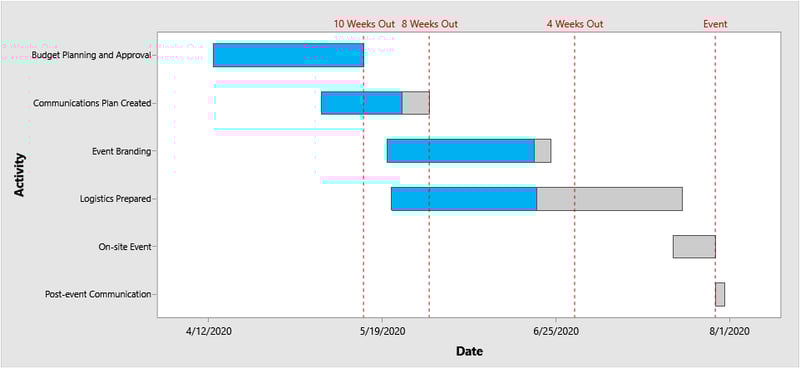
Gantt charts can be created in a variety of ways. Luckily, [Minitab Workspace](https://www.minitab.com/products/workspace/) offers two different types of Gantt chart templates, the standard Gantt Chart (shown below) and the Task Gantt Chart, as part of the 90+ tools available within the interface.
[](https://support.minitab.com/en-us/workspace/forms-and-analysis-captures/forms-and-form-based-tools/gantt-chart/)
So now you know what a Gantt chart is, but why should you use it?
## **Benefits of Using a Gantt Chart**
Gantt charts are more than just a visual tool to get an organized overview of a project. Gantt charts also provide benefits like:
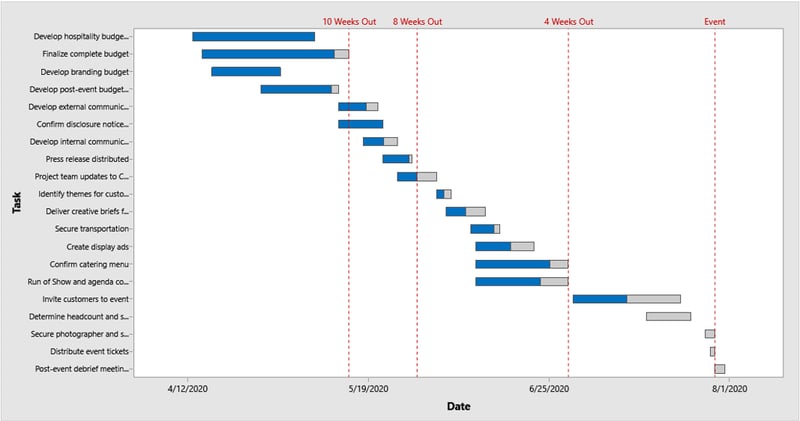
- **Enhanced Communication:** Particularly in an era where many people work remotely, communication is vital. Gantt charts can improve team communication as project managers can see who is working on a given part of the project, provide them with feedback and coordinate information with ease. Communication can be even stronger when everyone works off of a standard Gantt Chart template like the version in [Minitab Workspace](https://www.minitab.com/products/workspace/). The Gantt Chart is also perfect for communicating high-level plans and status updates to executives and stakeholders, while the Task Gantt Chart (shown below) is better to display and communicate work streams with their progress in more detail with your working team.
[](https://support.minitab.com/en-us/workspace/forms-and-analysis-captures/forms-and-form-based-tools/tasks-gantt-chart/)
- **Avoid Resource Overload:** Another major benefit of Gantt charts is that they can prevent resource overload. Many team problems arise when resources are stretched too thin across many tasks. Gantt charts can help you manage your resources effectively, ensuring that no team member is overburdened.
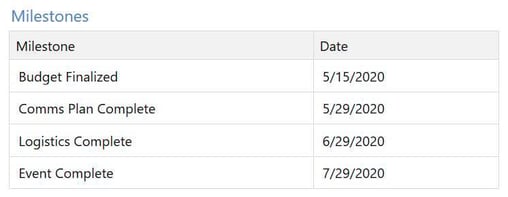
- **Ability to Track Progress:** With Gantt charts, you can make sure that you stick to your deadlines. You can easily see all tasks in progress and how they are proceeding relative to certain project milestones. This feature alone helps to make Gantt charts essential to any project. The milestone feature in [Minitab Workspace](https://www.minitab.com/products/workspace/) is especially helpful because it makes it easy to track, update and view these key project check points throughout the project in a clear written format.
## **So What is Included in a Gantt Chart?**
Now that you're ready to start your Gantt chart, you need to know what is officially included. There are several key components in each:
- When the project started
- What the various tasks of the project include
- Who has been assigned to work on each individual task
- When the tasks are supposed to start and finish
- How long each task will take
- Whether certain teams are supposed to collaborate and work together on a given project
- When the project will end
As the project unfolds, both team members and managers are able to view their assigned tasks and visually see progress, which helps everyone to see where their work is in relation to the other tasks in the project or particular work stream.
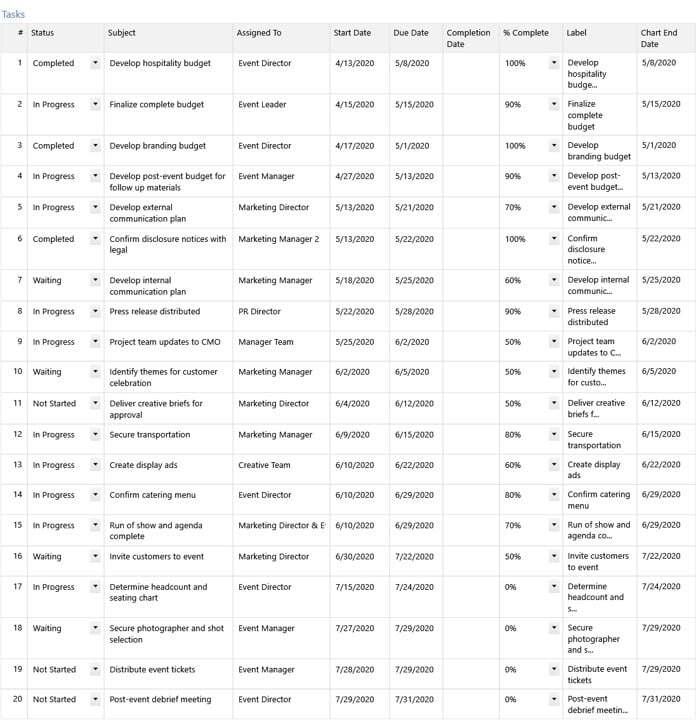
One of the coolest features included when you create a Gantt chart in [Minitab Workspace](https://www.minitab.com/products/workspace/) is the task list. As shown below, this written list includes of all the tasks in your Gantt chart while being clear of unnecessary clutter and easy for everyone to understand. Any changes made in this task list are also immediately reflected in your Gantt chart so the visual status is always up-to-date for all team members.
[](https://support.minitab.com/workspace/forms-and-analysis-captures/forms-and-form-based-tools/tasks-gantt-chart/)
## **Best Practices and Tips**
Gantt charts can seem a bit overwhelming to put together depending on the project size, number of team members and deadlines involved, but not to worry!
Here are our tips and best practices for Gantt charts:
- **Create Tasks in Groups:** In order to make your plan easier to read, enter tasks in groups or work streams. This will help your team members see which tasks overlap time-wise and how they work together or depend on one another to reach the final goal.
- **Get Detailed:** Gantt charts are flexible and can be designed to be as detailed or high-level as you'd like. As mentioned, we recommend the Standard Gantt Chart in Minitab Workspace to showcase the relationships between tasks and milestones on a high-level to provide status and details to executives and stakeholders, while the Task Gantt Chart is better for more details and use with your working team.
- **Designate Responsible Parties:** Clearly indicate who is responsible for each part of the task when creating a Gantt chart. This will help avoid confusion regarding who should be handling what task when.
- **Remember Timing is Everything:** Don't forget to add in specific start and end dates for each task along; it's hard to track progress and keep your team moving forward without them. That being said, make sure you include any holidays and time-off for vacations as well to avoid deadlines being missed as we all deserve some rest and relaxation now and again.
Have you kicked off any projects recently that could use the help of a Gantt chart? Maybe you already have one in progress, but it's never too late to manage and execute your projects flawlessly with the help of Minitab Workspace.
### Create Gantt charts with ease; start with our templates in Minitab Workspace [](https://cta-redirect.hubspot.com/cta/redirect/3447555/e423ffa1-d14c-4994-8cad-609c24506cd1)
### Want to learn more about Gantt charts from our experts? [Check out our training services today!](https://www.minitab.com/en-us/resources-services/services/training/)
## You Might Also Like
[Turning OEE Data into Action: How to Use Minitab to Drive Measurable Improvement](https://blog.minitab.com/en/blog/turning-oee-data-into-action-how-to-use-minitab-to-drive-measurable-improvement?hsLang=en)
[Minitab Solution Center](https://blog.minitab.com/en/blog/tag/minitab-solution-center) | 13 Minute Read
[6 Steps to Go from Seeing Processes to Optimizing Them with AI](https://blog.minitab.com/en/blog/6-steps-to-go-from-seeing-processes-to-optimizing-them-with-ai?hsLang=en)
[Minitab Solution Center](https://blog.minitab.com/en/blog/tag/minitab-solution-center) | 5 Minute Read
[Using Monte Carlo Simulation for Scenario Analysis of Your Forecast](https://blog.minitab.com/en/blog/using-monte-carlo-simulation-for-scenario-analysis-of-your-forecast?hsLang=en)
[Minitab Workspace](https://blog.minitab.com/en/blog/tag/minitab-workspace) | 4 Minute Read
---
- [Careers](https://www.minitab.com/en-us/company/careers/)
- [Trust Center](https://www.minitab.com/en-us/trust-center/)
- [Suppliers](https://www.minitab.com/en-us/suppliers/)
- [Site Map](https://www.minitab.com/en-us/site-map/)
- [](https://www.linkedin.com/company/minitab/)
- [](https://www.facebook.com/Minitab/)
- [](https://www.youtube.com/user/MinitabInc)
- [](https://www.instagram.com/minitab/)
---
© 2025 Minitab, LLC. All Rights Reserved.
- [Terms of Use](https://www.minitab.com/en-us/legal/terms-of-use/)
- [Privacy Policy](https://www.minitab.com/en-us/legal/privacy-policy/)
- [Legal](https://www.minitab.com/en-us/legal/)
- Cookies Settings