---
title: Installing Minitab 17 on a Virtual Machine, Part 1
description: Installing Minitab 17 on a Virtual Machine, Part 1
image: https://blog.minitab.com/hubfs/B2BML%20-%20NEW%20FILE%20MANAGER%20STRUCTURE/Blog%20Images/Imported_Blog_Media/missing-image-Jul-06-2025-12-05-46-8388-AM.png
---
English
- [English](https://blog.minitab.com/en/?hsLang=en)
- [Français](https://blog.minitab.com/fr/?hsLang=en)
- [Deutsch](https://blog.minitab.com/de/?hsLang=en)
- [Português](https://blog.minitab.com/pt/?hsLang=en)
- [Español](https://blog.minitab.com/es/?hsLang=en)
- [日本語](https://blog.minitab.com/ja/?hsLang=en)
- [한국어](https://blog.minitab.com/ko/?hsLang=en)
- [中文(简体)](https://blog.minitab.com/zh/?hsLang=en)
- [ Partners](https://www.minitab.com/en-us/company/partners/)
- [ Contact](https://www.minitab.com/en-us/company/contact-us/)
- [ Talk to Minitab](https://www.minitab.com/en-us/talk-to-minitab/)
- [ My Account](https://licensing.minitab.com/account/manage)
[](https://www.minitab.com/en-us/)
- Products
Back
[Products](https://www.minitab.com/en-us/products/)
[All Products](https://www.minitab.com/en-us/products/)
- [Minitab Solution Center](https://www.minitab.com/en-us/products/minitab-solution-center/)
- [Minitab Statistical Software](https://www.minitab.com/en-us/products/minitab/)
- [Minitab Connect](https://www.minitab.com/en-us/products/connect/)
- [Minitab Model Ops](https://www.minitab.com/en-us/products/model-ops/)
- [Minitab Education Hub](https://www.minitab.com/en-us/products/education-hub/)
- [Minitab Engage](https://www.minitab.com/en-us/products/engage/)
- [Minitab Workspace](https://www.minitab.com/en-us/products/workspace/)
- [Real-Time SPC](https://www.minitab.com/en-us/products/real-time-spc/)
- [Prolink Data Collection & SPC](https://www.minitab.com/en-us/products/prolink)
- [Simul8 Discrete Event Simulation](https://info.minitab.com/en/new-to-simul8?hsLang=en)
- [SPM](https://www.minitab.com/en-us/products/spm/)
- Solutions
Back
[Solutions](https://www.minitab.com/en-us/solutions/)
[All Solutions](https://www.minitab.com/en-us/solutions/)
- [Analytics](https://www.minitab.com/en-us/solutions/analytics/)
- [Statistics & Predictive Analytics](https://www.minitab.com/en-us/solutions/analytics/statistical-analysis-predictive-analytics/)
- [Data Science & Machine Learning](https://www.minitab.com/en-us/solutions/analytics/data-science-machine-learning/)
- [Business Analytics & Intelligence](https://www.minitab.com/en-us/solutions/analytics/business-analytics-intelligence/)
- [Statistical Process Control](https://www.minitab.com/en-us/solutions/analytics/statistical-process-control/)
- [Quality Analytics](https://www.minitab.com/en-us/solutions/analytics/quality-analytics/)
- [Live Analytics](https://www.minitab.com/en-us/solutions/analytics/live-analytics/)
- [Reliability & Life Data Analysis](https://www.minitab.com/en-us/solutions/analytics/reliability/)
- [Discrete Event Simulation](https://info.minitab.com/en/new-to-simul8?hsLang=en)
- [Process Mining](https://info.minitab.com/en/new-to-simul8?hsLang=en)
- [Key Capabilities](https://www.minitab.com/en-us/solutions/key-capabilities/)
- [Continuous Improvement](https://www.minitab.com/en-us/solutions/key-capabilities/continuous-improvement/)
- [Data Integration & Data Prep](https://www.minitab.com/en-us/solutions/key-capabilities/data-integration-data-prep/)
- [Diagramming & Mind Mapping](https://www.minitab.com/en-us/solutions/key-capabilities/diagramming-mind-mapping/)
- [Digital Twins](https://info.minitab.com/en/new-to-simul8?hsLang=en)
- [Model Deployment & ML Ops](https://www.minitab.com/en-us/solutions/key-capabilities/model-deployment-ml-ops/)
- [Innovation & Project Management](https://www.minitab.com/en-us/solutions/key-capabilities/innovation-project-management/)
- [Process Excellence: Detect, Correct & Prevent](https://www.minitab.com/en-us/solutions/key-capabilities/process-excellence/)
- [Featured Industries](https://www.minitab.com/en-us/solutions/industry/)
- [Academic](https://www.minitab.com/en-us/solutions/industry/academic/)
- [Energy & Natural Resources](https://www.minitab.com/en-us/solutions/industry/energy-resources/)
- [Government & Public Sector](https://www.minitab.com/en-us/solutions/industry/government/)
- [Healthcare](https://www.minitab.com/en-us/solutions/industry/healthcare/)
- [Insurance](https://www.minitab.com/en-us/solutions/industry/insurance/)
- [Manufacturing & Industrial](https://www.minitab.com/en-us/solutions/industry/manufacturing-industrial/)
- [Services](https://www.minitab.com/en-us/solutions/industry/service-industries/)
- [Software & Technology](https://www.minitab.com/en-us/solutions/industry/software-technology/)
- [Construction](https://www.minitab.com/en-us/solutions/industry/construction/)
- [Featured Roles](https://www.minitab.com/en-us/solutions/role/)
- [Engineering](https://www.minitab.com/en-us/solutions/role/engineering/)
- [Business Analysis](https://www.minitab.com/en-us/solutions/role/business-analysts/)
- [Information Technology](https://www.minitab.com/en-us/solutions/role/information-technology/)
- [Supply Chain](https://www.minitab.com/en-us/solutions/role/supply-chain/)
- [Customer Service & Contact Center](https://www.minitab.com/en-us/solutions/role/customer-service-contact-center/)
- [Human Resources](https://www.minitab.com/en-us/solutions/role/human-resources/)
- [Marketing](https://www.minitab.com/en-us/solutions/role/marketing/)
- [Research and Development](https://www.minitab.com/en-us/solutions/role/research-and-development/)
- Resources & Services
Back
[Resources & Services](https://www.minitab.com/en-us/resources-services/)
[All Resources & Services](https://www.minitab.com/en-us/resources-services/)
- [Resources](https://www.minitab.com/en-us/resources-services/resources/)
- [Case Studies](https://www.minitab.com/en-us/resources-services/resources/case-studies/)
- [eBooks & White Papers](https://www.minitab.com/en-us/resources-services/resources/ebooks-and-white-papers/)
- [Blog](https://blog.minitab.com/blog/?hsLang=en)
- [Data Sets](https://www.minitab.com/en-us/resources-services/resources/data-set/)
- [Webinars & Events](https://www.minitab.com/en-us/resources-services/resources/events/)
- [Education Hub](https://www.minitab.com/en-us/resources-services/resources/education-hub/)
- [Services](https://www.minitab.com/en-us/resources-services/services/)
- [Training](https://www.minitab.com/en-us/resources-services/services/training/)
- [Deployment](https://www.minitab.com/en-us/resources-services/services/deployment/)
- [Consulting](https://www.minitab.com/en-us/resources-services/services/statistical-consulting/)
- [Self-Paced Learning](https://www.minitab.com/en-us/resources-services/services/self-paced-learning/)
- [Continuing Education](https://www.minitab.com/en-us/resources-services/services/continuing-education/)
- Support
Back
[Support](https://www.minitab.com/en-us/support/)
[Technical Support](https://www.minitab.com/en-us/support/)
- [Subscriptions & Activation](https://www.minitab.com/en-us/support/subscriptions-and-activation/)
- [Minitab Quick Start](https://www.minitab.com/en-us/support/quick-start/)
- [Training](https://www.minitab.com/en-us/resources-services/services/training/)
- [Installation Support](https://www.minitab.com/en-us/support/installation/)
- [Support Videos](https://www.minitab.com/en-us/support/videos/)
- [Support Documentation](https://www.minitab.com/en-us/support/documents/)
- [Software Updates](https://www.minitab.com/en-us/support/software-updates/)
- [Product Downloads](https://www.minitab.com/en-us/support/downloads/)
- [Support Policy](https://www.minitab.com/en-us/support/policy/)
- Company
Back
[Company](https://www.minitab.com/en-us/company/)
[Company](https://www.minitab.com/en-us/company/)
- [About Us](https://www.minitab.com/en-us/company/our-company/)
- [Leadership Team](https://www.minitab.com/en-us/company/leadership-team/)
- [Partners](https://www.minitab.com/en-us/company/partners/)
- [Careers](https://www.minitab.com/en-us/company/careers/)
- [Contact](https://www.minitab.com/en-us/company/contact-us/)
- [News](https://www.minitab.com/en-us/company/press-releases/)
[Try/Buy](https://www.minitab.com/en-us/try-buy/)
- [Statistics](https://blog.minitab.com/en/blog/tag/statistics)
- [Data Analysis](https://blog.minitab.com/en/blog/tag/data-analysis)
-
- [Quality Improvement](https://blog.minitab.com/en/blog/tag/quality-improvement)
- [Subscribe](https://info.minitab.com/blog/subscribe?hsLang=en)

## Notice
You are now leaving minitab.com.
Click Continue to proceed to:
Continue
Go Back
# Installing Minitab 17 on a Virtual Machine, Part 1
Minitab Blog Editor | 12/29/2015
Topics: [Statistics](https://blog.minitab.com/en/blog/tag/statistics)
- [Share](https://www.linkedin.com/shareArticle?mini=true&url=https://blog.minitab.com/en/blog/marilyn-wheatleys-blog/installing-minitab-17-on-a-virtual-machine-part-1)
- [Share](https://www.facebook.com/sharer.php?u=https://blog.minitab.com/en/blog/marilyn-wheatleys-blog/installing-minitab-17-on-a-virtual-machine-part-1)
While Minitab 17 is currently a Windows-only application, there are people who only have a Mac available for the installation who also find they need to use Minitab 17.
It is possible to run Minitab 17 on a Macintosh, though the steps involved in the installation can seem a little daunting at first. In the Technical Support department, we sometimes hear reluctance in people’s voices when we throw out terms like ‘Apple Boot Camp’ or ‘desktop virtualization software.'
*NOTE: Minitab products have not been rigorously tested in either Apple Boot Camp or desktop virtualization software, and assistance from Minitab Technical Support is limited. Before purchasing a Minitab product, it is strongly recommended that you download the trial version of the software to test in your environment. Because the trial version will not run in a virtual environment without a product key, please contact [Technical Support](http://www.minitab.com/support/) for help running the trial on a virtual machine.*
So for those of you who would like to install Minitab 17 on your Mac, my goal is to show you exactly how to do it. In this first post in a 2-part series, I’ll walk through the installation using Apple's Boot Camp software.
In addition to your Mac, you’ll need:
- A flash drive
- A copy of Windows 7 or later version ISO
- And of course, Minitab 17 Statistical Software
Boot Camp is a product from Apple that allows you to install and dual-boot your Intel-based Mac in OS X or Windows. With this software, you must boot solely in OS X or Windows—you cannot use OS X and Windows at the same time. The advantage of using Boot Camp is that Windows runs natively, which reduces the likelihood of technical issues.
Boot Camp is included for free with Mac OS X Leopard (v10.5) or higher. If you plan to install Windows 7, it is recommended that you use the Boot Camp software included with Snow Leopard (v10.6) or above. For more information about Boot Camp, see this Apple support page: [https://support.apple.com/en-us/HT201468](https://support.apple.com/en-us/HT201468)
To get started, save your Windows ISO to the desktop on your Mac, and plug in your flash drive.
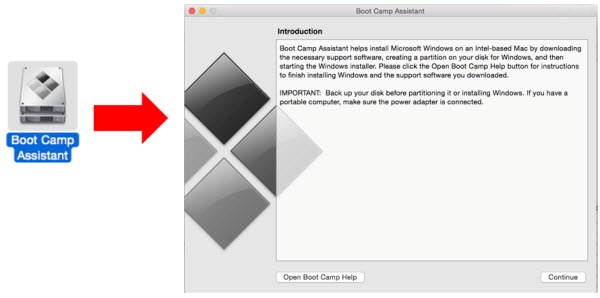
To install Minitab 17 on a Mac using Apple Boot Camp, locate the **Apple Boot Camp Assistant** in Finder on your Mac, and double-click on the icon to get started. Click **Continue** in the Introduction window:
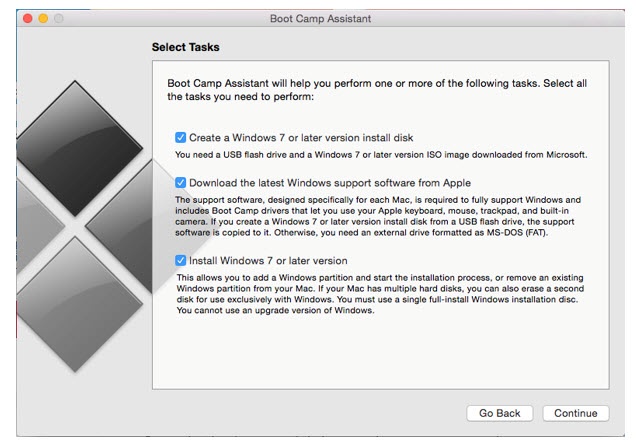
Select the options you’d like to use in the window below (I’m using all three), make sure your USB drive is plugged in, then click **Continue** again:
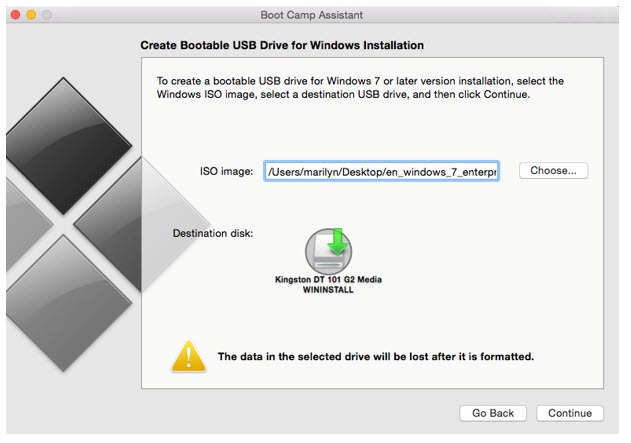
The Boot Camp Assistant found the Windows ISO on my desktop in the **ISO image** path shown below, and will create the bootable USB in with the flash drive listed under **Destination disk**. Click **Continue** to confirm:
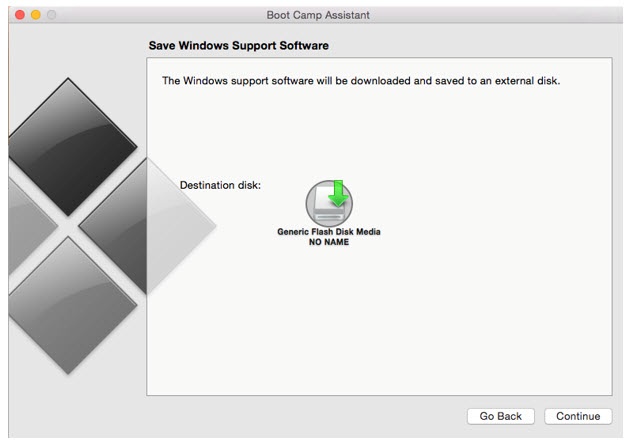
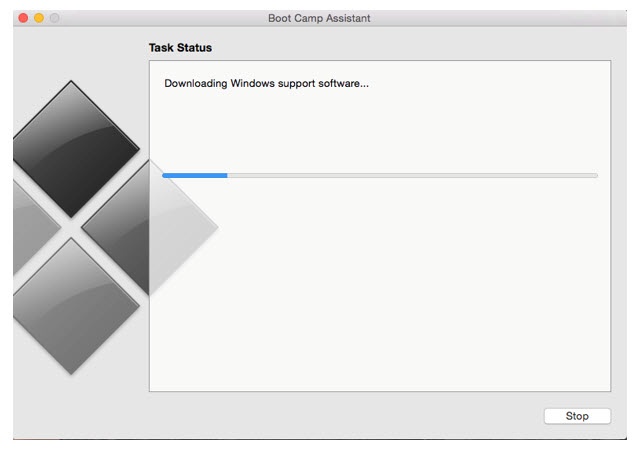
Once the bootable USB step is complete, the Boot Camp Assistant will download and save the Windows support software to the flash drive as shown below. Click **Continue** again:
The **Task Status** window will show during the download:
After the download above completes, choose how to partition the hard drive for the third step in the window shown below, then click **Install**:
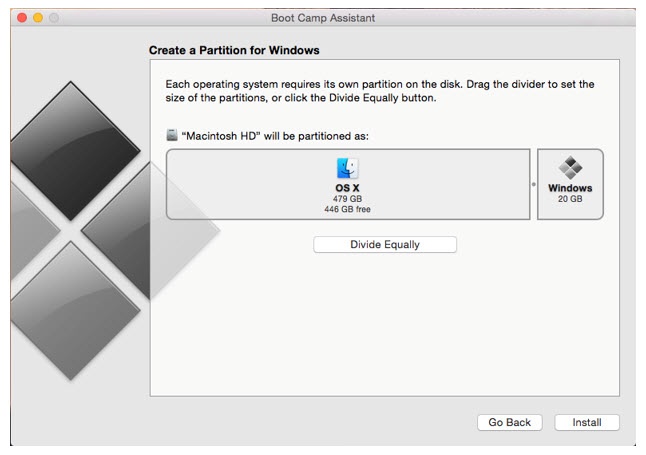Once the hard drive is partitioned, the machine will require a restart and will boot up in Windows.
Once the Windows installation process begins, follow the on-screen instructions to complete the installation (you’ll have to accept several prompts to continue installing Windows, including language, license agreement, etc.).
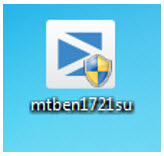
Once the Windows installation is complete and your Mac is booted up in Windows, save the Minitab 17 installer to the desktop, then double-click on mtben1721su to launch the setup:
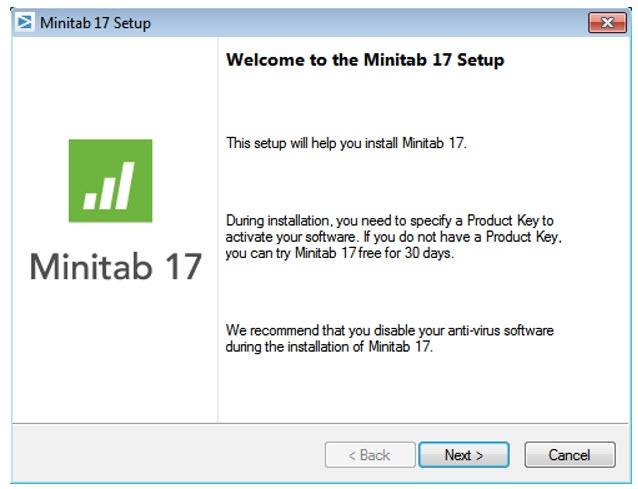
On the first setup screen, click **Next**:
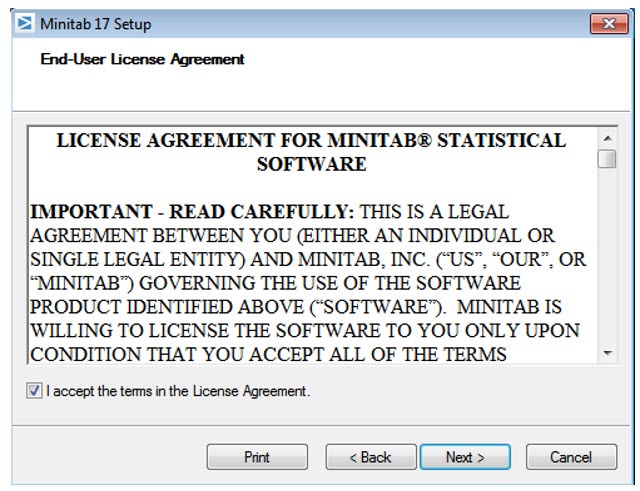
Check the box to accept the license agreement and click **Next** again:
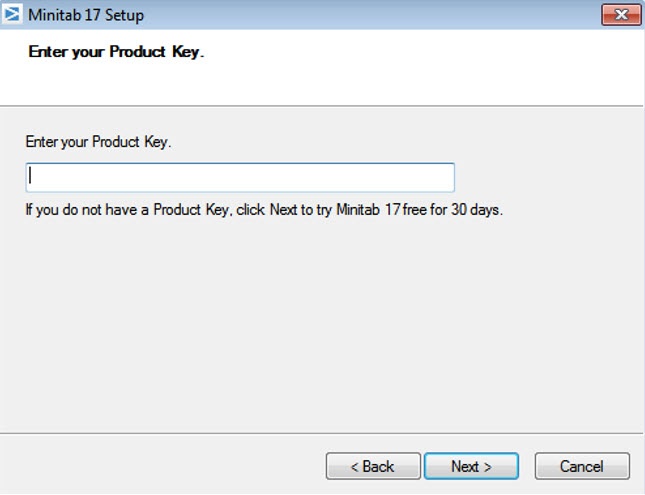
Enter your 18-digit product key and click **Next**:
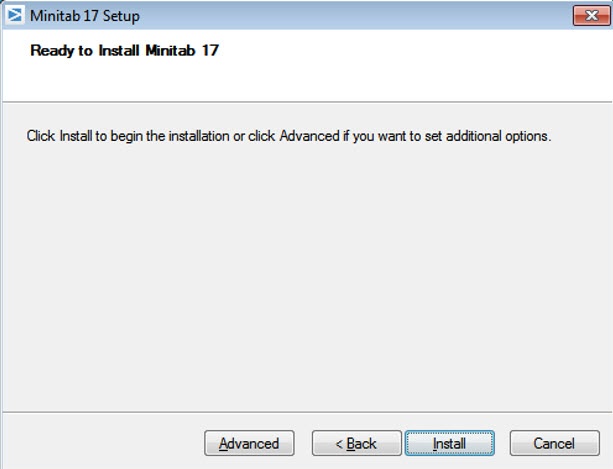
On the Ready to Install Minitab 17 screen, click **Install**:
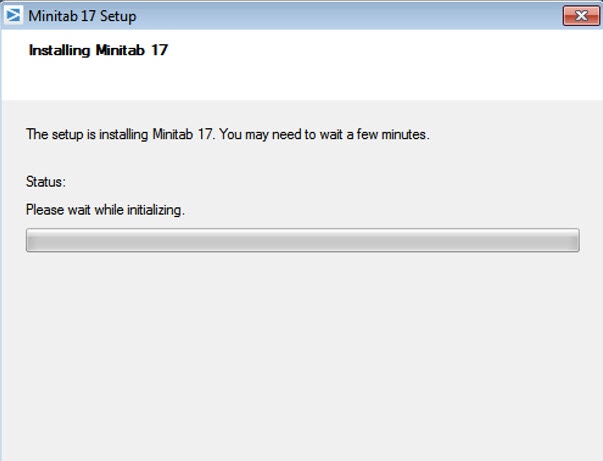
Minitab will show a progress bar during the installation:
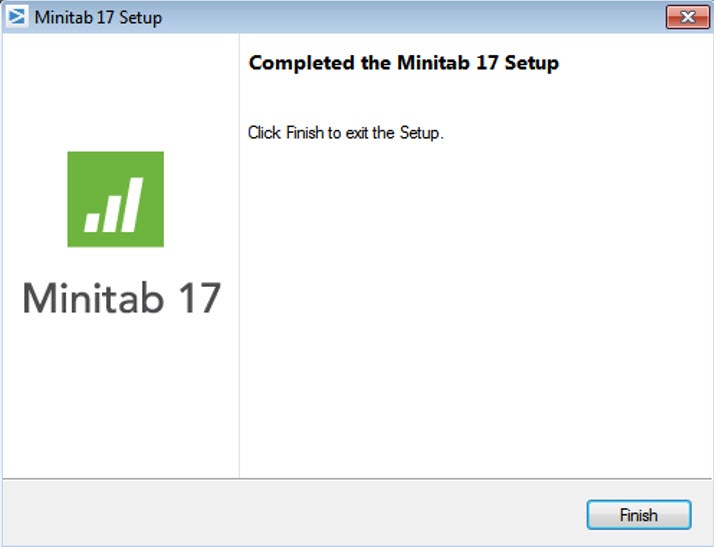
When the setup is complete, click **Finish**:
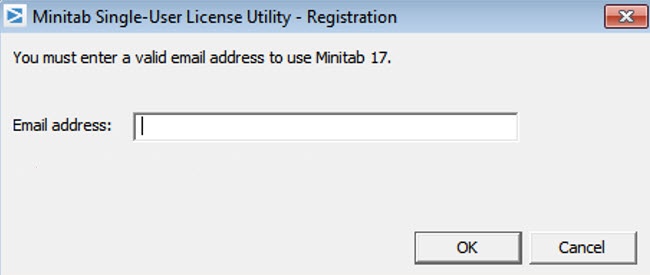
Next, double-click on the Minitab 17 icon on the desktop to launch Minitab 17. You’ll be prompted to enter an email address to register, then click **OK**:
If a product key wasn’t entered during the installation (or, if the license wasn’t activated), you’ll have the option to use the free trial or to activate with a Product key. Complete the activation, and Minitab 17 is ready to go on your Mac!
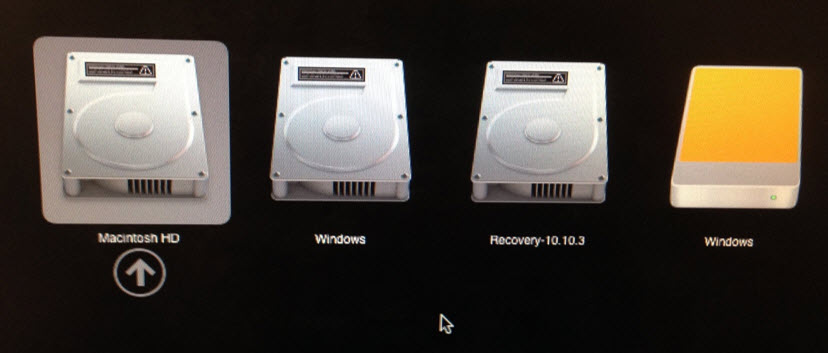
Each time you want to switch between the Mac and Windows partition on your hard drive, you’ll need to restart your Mac while holding down the **alt (option)** key on your keyboard.
That will give you the option of which partition to use in a screen similar to the one above- when you boot up the machine in Windows you can use Minitab 17. When you want to go back to your Mac OS make that selection when you reboot the machine.
When using Windows on your Mac, it is best to shut down Windows when you are finished using your software. Closing the lid of your notebook computer may cause Windows to hibernate or suspend, which can cause an error about a tampered license. If that happens, try shutting down Windows and rebooting the virtual computer.
Stay tuned for part II of this post, where I’ll explain [how to install Minitab 17 on a Mac using desktop virtualization software](https://blog.minitab.com/blog/marilyn-wheatleys-blog/installing-minitab-17-on-a-virtual-machine%2C-part-2?hsLang=en).
## You Might Also Like
[IT vs. OT: Unlocking the Power of Convergence](https://blog.minitab.com/en/blog/it-vs.-ot-unlocking-the-power-of-convergence?hsLang=en)
[Operations](https://blog.minitab.com/en/blog/tag/operations) | 6 Minute Read
[Updating Graphs, Making Patterned Data and More Tips & Tricks to Help You Master Minitab](https://blog.minitab.com/en/blog/updating-graphs-patterned-data-tips-tricks-master-minitab?hsLang=en)
[Statistics](https://blog.minitab.com/en/blog/tag/statistics) | 6 Minute Read
[Against the Odds: Honoring Women in Math and Statistics](https://blog.minitab.com/en/blog/honoring-women-in-math-and-statistics?hsLang=en)
[Statistics](https://blog.minitab.com/en/blog/tag/statistics) | 5 Minute Read
---
- [Careers](https://www.minitab.com/en-us/company/careers/)
- [Trust Center](https://www.minitab.com/en-us/trust-center/)
- [Suppliers](https://www.minitab.com/en-us/suppliers/)
- [Site Map](https://www.minitab.com/en-us/site-map/)
- [](https://www.linkedin.com/company/minitab/)
- [](https://www.facebook.com/Minitab/)
- [](https://www.youtube.com/user/MinitabInc)
- [](https://www.instagram.com/minitab/)
---
© 2025 Minitab, LLC. All Rights Reserved.
- [Terms of Use](https://www.minitab.com/en-us/legal/terms-of-use/)
- [Privacy Policy](https://www.minitab.com/en-us/legal/privacy-policy/)
- [Legal](https://www.minitab.com/en-us/legal/)
- Cookies Settings